
Displaying Google reviews on a WordPress website sounds simple until you start comparing plugins.
You need something that can pull in reviews reliably, keep them available on your site, look good across desktop and mobile, work with multiple locations, and give you enough control to make the review section fit your design.
That is where WP Google Review Slider comes in.
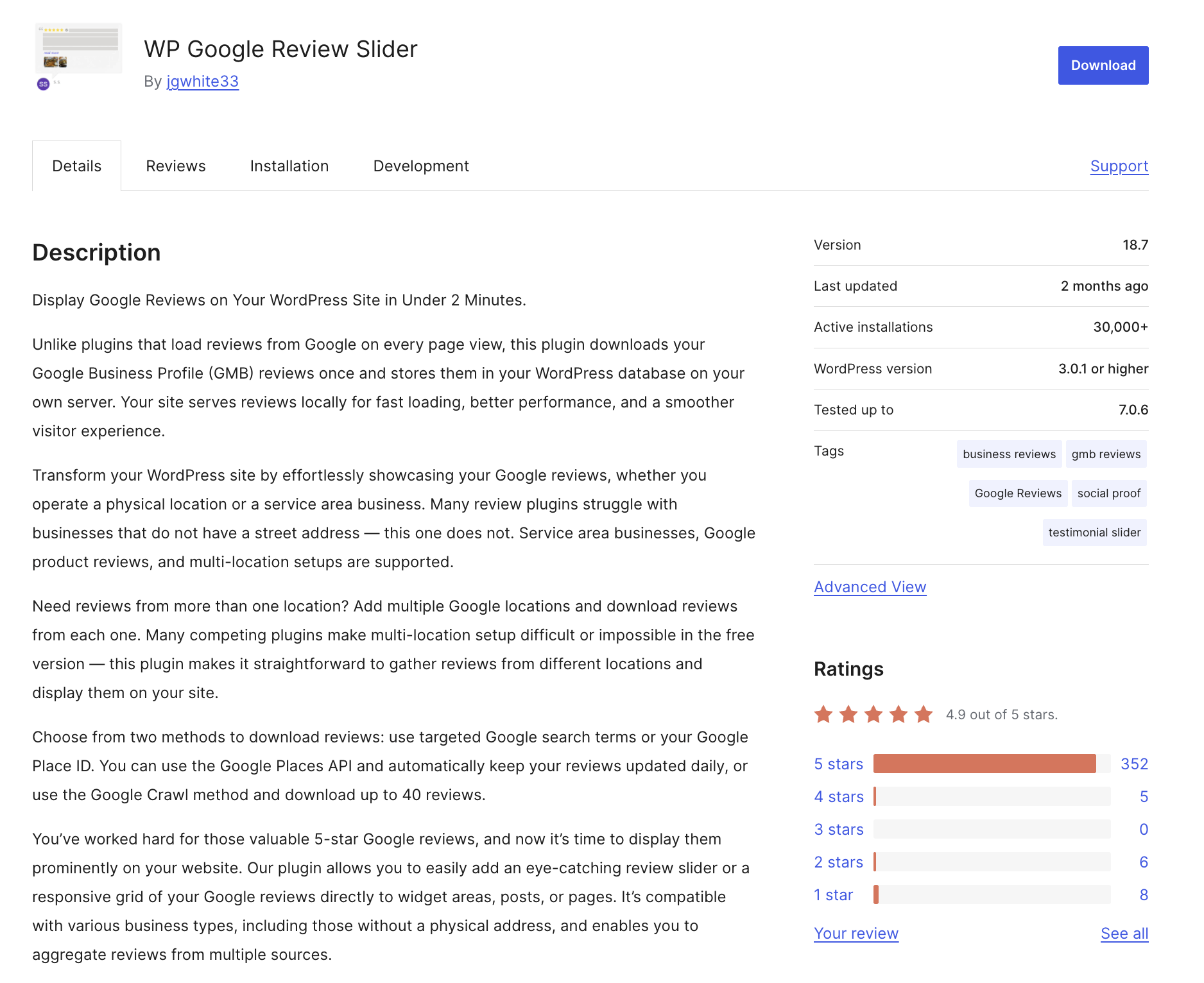
WP Google Review Slider is a WordPress plugin from LJ Apps that imports Google Business Profile reviews and stores them in your WordPress database so they can be displayed locally. The plugin currently lists 30,000+ active installations, a 4.9/5 rating, and version 18.7 on WordPress.org. Its latest changelog includes an analytics page and several recent security-related fixes and hardening updates.
But popularity alone does not answer the important question:
Is WP Google Review Slider actually a good Google Reviews plugin for WordPress in 2026?
My assessment is yes, with some important qualifications. It is particularly attractive for businesses and agencies that want local review storage, multiple locations, extensive display controls and a WordPress-native solution. However, its security history means keeping the plugin updated is not optional, and users looking for a very simple one-purpose widget may find some of its wider functionality unnecessary.

One important note about this review: the assessment below is based on the current WordPress.org listing, official product/pricing information, changelog, security records and Google’s current Search documentation and our Review Methodology. It does not claim an independent seven-day hands-on performance test.
WP Google Review Slider at a Glance
| Factor | Current information |
|---|---|
| Plugin | WP Google Review Slider |
| Developer | LJ Apps / Josh White |
| Current version | 18.7 |
| Active installations | 30,000+ |
| WordPress.org rating | 4.9/5 |
| Main purpose | Display Google and other customer reviews on WordPress |
| Google Reviews | Yes |
| Multiple locations | Yes |
| Service-area businesses | Yes |
| Slider | Yes |
| Grid/List layouts | Yes |
| Review filtering | Yes |
| Custom CSS | Yes |
| Review badges | Yes |
| Pro version | Yes |
| Lifetime plans | Yes |
| Current security attention | Recent hardening and fixes |
WordPress.org currently lists version 18.7, 30,000+ active installations and a 4.9/5 rating. The developer profile identifies Josh White and LJ Apps as the developer behind the plugin.
What Is WP Google Review Slider?
WP Google Review Slider is a WordPress plugin that lets you display customer reviews on your website instead of forcing visitors to leave your site to see them.
Its main differentiator is how it handles review data.
Rather than retrieving the reviews from Google every time a visitor loads a page, the plugin says it downloads the reviews and stores them in the WordPress database on your own server. The website can then serve the stored reviews locally.
That approach has a practical advantage.
A page containing a review widget is not automatically dependent on making a fresh external request to Google for every visitor. It also gives the site owner more control over how the reviews are displayed.
The plugin supports traditional businesses as well as service-area businesses, and it can handle multiple Google locations.
How Does WP Google Review Slider Work?
At a high level, the process is straightforward:
- Install and activate the WordPress plugin.
- Open its settings from the WordPress admin area.
- Connect or locate the relevant Google business/location.
- Download the available reviews.
- Create a review template.
- Choose a slider, grid or other display style.
- Place the resulting review display on your website.
The plugin’s WordPress.org installation instructions direct users to activate it through the WordPress Plugins menu and then look for the WP Google Reviews menu item in the WordPress admin.
For organizations managing more than one location, the ability to download reviews from multiple businesses is one of the more useful parts of the plugin.
WP Google Review Slider Features
The plugin has evolved well beyond its original “review slider” name.
Google Review Slider

The core use case is still exactly what the name suggests: displaying Google reviews in a visual slider.
You can create review displays that behave more like a testimonial carousel than a simple text block.
That makes the plugin useful on:
- Homepages
- Service pages
- Product pages
- Landing pages
- About pages
- Dedicated testimonials pages
- Local business websites
Grid and List Layouts
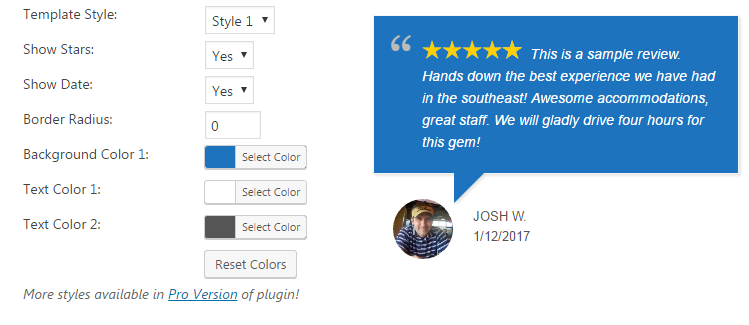
A slider isn’t always the best presentation.
Some websites work better with a static grid where several reviews are visible simultaneously. Others may prefer a traditional list.
WP Google Review Slider supports different presentation formats, with additional styles available in Pro. Its current plugin listing also documents templates, badges, customer images and significant visual customization.
This is important because “Google review slider” doesn’t necessarily mean every site should literally use a slider.
For conversion-focused pages, a grid can sometimes provide more immediately visible social proof.
Multiple Google Locations
This is one of the strongest practical features.
Businesses with multiple branches can download reviews from different Google locations and manage them within the plugin rather than building separate systems for every branch.
That makes it particularly relevant for:
- Restaurant chains
- Clinics
- Hotels
- Local service companies
- Agencies managing several locations
- Franchise businesses
For a single-location small business, this feature may never matter. For an agency or multi-location company, it can be a major reason to choose the plugin.
Support for Service-Area Businesses
One interesting detail is that the plugin explicitly supports service-area businesses that do not have a physical street address.
That matters for businesses such as:
- Plumbers
- Electricians
- Home services
- Consultants
- Contractors
- Mobile professionals
- Other businesses that travel to customers
This is a useful distinction because many businesses do not fit the traditional storefront model.
Review Filtering
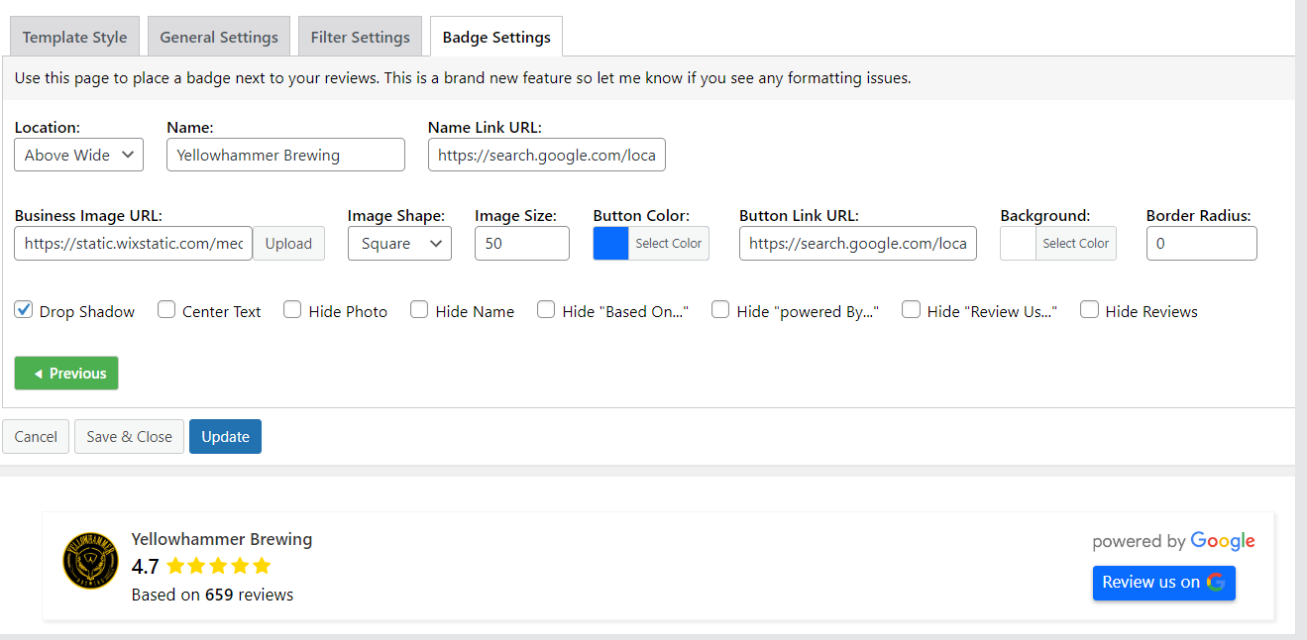
The plugin provides considerable control over which reviews appear.
According to its current feature listing, you can:
- Set a minimum rating
- Hide shorter or longer reviews based on word count
- Select particular reviews
- Combine different review sources
- Display selected review types
Those controls can be useful when creating a carefully designed testimonial section rather than simply dumping every imported review onto a page.
There is, however, an important strategic consideration here.
Filtering should not become a way to make your customer feedback look artificially perfect.
Showing your strongest reviews may be appropriate for a homepage testimonial block, but selectively hiding legitimate negative feedback can reduce trust. Your editorial approach should match the purpose of the page.
Can WP Google Review Slider Display Reviews From Other Platforms?
Yes.
This is where the plugin becomes more than a Google-only solution.
Its feature documentation describes support for review sources including:
- Yelp
- TripAdvisor
- Manually entered reviews
The official product site says the Pro version can pull reviews from 110+ review sites, positioning the product as a wider review aggregation platform rather than simply a Google Reviews widget.
That broader functionality is useful for businesses that have built reputation across several platforms.
It is less important when Google is the only review source you care about.
Review Templates and Customization
One of the more appealing aspects of WP Google Review Slider is the amount of control it gives you over presentation.
The plugin supports:
- Multiple templates
- Slider layouts
- Grid layouts
- Badges
- Customer images
- Lightbox image viewing
- Custom CSS
- Review display controls
- Various date formats
- Reviewer display options
The official plugin page specifically mentions customizable templates, customer images, lightbox support, badges and custom CSS.
The Pro product page currently highlights 14 templates, along with sliders, grids and floating review displays.
For designers and agencies, this flexibility matters.
A good review plugin should not make every website look like it installed the same widget.
WP Google Review Slider Performance: Does Local Storage Help?
This is one area where it is important to separate architecture from independent performance testing.
The plugin says it downloads reviews and stores them in your WordPress database, allowing the website to display the stored reviews locally rather than contacting Google on every page view.
Conceptually, that can be beneficial because it reduces dependence on a live external review request during each visitor’s page load.
The plugin has also made performance-related changes over its history. For example, its changelog notes earlier changes involving minified/combined CSS and JavaScript, lazy-loaded images and PageSpeed-related improvements.
But that does not mean:
“This plugin automatically makes your website fast.”
Real-world performance will still depend on:
- Number of reviews displayed
- Review images
- Theme
- Page builder
- Other plugins
- Hosting
- Caching
- JavaScript configuration
- Overall page complexity
So I would treat the plugin’s local-storage approach as a good architectural decision, not as a substitute for actual Core Web Vitals testing.
WP Google Review Slider Pricing
One of the nice things about this product is that the pricing structure is unusually easy to understand.
The current official pricing page lists the following Pro plans:
| Plan | Yearly | Lifetime | Sites |
|---|---|---|---|
| Starter | $29/year | $99 | 1 |
| Business | $59/year | $199 | 5 |
| Agency | $149/year | $449 | 50 |
All listed plans include the full feature set and developer support, and the site currently advertises a 30-day money-back guarantee.
There is also a free seven-day trial shown for the paid plans.
Is the Lifetime Plan Worth It?
For a business running one or more WordPress websites for several years, the lifetime option is particularly interesting.
The math is simple.
At the current published pricing, the $99 lifetime Starter license costs roughly the equivalent of 3.4 years of the $29 annual Starter plan.
For an agency, the comparison is even more compelling if the plugin becomes part of your standard WordPress toolkit.
However, lifetime licensing should never be evaluated purely on the word “lifetime.” The real question is whether the plugin continues to receive updates and support.
The current changelog suggests that development is ongoing, with version 18.7 adding analytics and versions 18.5, 18.4, 18.2 and 18.1 containing security-related work.
WP Google Review Slider Security in 2026
This is the section many lightweight plugin reviews would probably skip.
I would not.
WPScan currently lists 13 reported vulnerabilities for WP Google Review Slider. Importantly, these cover different historical versions, and several recent vulnerabilities have documented fixes.
Recent entries include:
| Affected version | Issue | Fixed in |
|---|---|---|
| <18.5 | Authenticated SQL injection | 18.5 |
| <18.5 | Cross-site request forgery | 18.5 |
| <18.2 | Reflected XSS via place parameter | 18.2 |
| <18.1 | Unauthenticated stored XSS | 18.1 |
| ≤6.1 | Unauthenticated SQL injection | No known fix listed |
WPScan’s database records these issues and their affected/fixed versions.
This needs some context.
It would be inaccurate to say:
“WP Google Review Slider is unsafe.”
The more accurate conclusion is:
The plugin has a meaningful historical vulnerability record, including vulnerabilities disclosed in 2026, so site owners should treat updates as a security requirement.
The current WordPress.org changelog supports that ongoing maintenance story. Version 18.5 added general security hardening, 18.4 changed a database query to use $wpdb->prepare(), 18.2 fixed reflected XSS, and 18.1 added further security hardening.
Our security takeaway
Do not install an old ZIP file of the plugin and leave it untouched for years.
Use a current version from a trusted source, keep WordPress updated, keep backups, and monitor plugin security advisories.
For agencies managing client websites, that should be part of the standard maintenance process anyway.
Is WP Google Review Slider Good for SEO?
It can be useful for website UX and conversion, but installing a review plugin is not an SEO shortcut.
Displaying genuine customer feedback can make a commercial page more useful and persuasive.
It can help visitors understand:
- What customers like
- What experiences people had
- How your business is perceived
- Why someone should trust the business
But there is a major distinction between using reviews on a page and earning Google review-rich-results stars.
Those are not the same thing.
Does WP Google Review Slider Give You Google Review Stars in Search?
Not automatically.
The plugin advertises review snippet markup functionality, but Google’s documentation makes clear that eligibility for structured-data features does not guarantee that Google will show a rich result. Google’s supported review snippet types include several entity types, including Software App, Product and Local Business under specific conditions. WordPress.org
There is another important rule.
For LocalBusiness markup, Google restricts self-serving reviews. Google says LocalBusiness review rich results are intended for sites that capture reviews about other businesses, rather than simply publishing reviews about themselves.
So don’t publish an article saying:
“Install this plugin and get 5-star Google stars in Search.”
That is misleading.
A better SEO strategy is to use reviews as useful supporting content and trust signals for human visitors, while implementing structured data only where it accurately represents the page and meets Google’s guidelines.
WP Google Review Slider and Google’s Reviews System
There is another reason the content surrounding your review plugin matters.
Google says its Reviews System is designed to reward reviews that contain insightful analysis, original research and evidence, rather than thin pages that simply summarize products.
That has implications for publishers reviewing WP Google Review Slider.
A page that merely rewrites the plugin’s feature list is weak.
A useful review should explain:
- What the plugin actually does
- Why a feature matters
- What the limitations are
- How it differs from alternatives
- What types of users benefit
- What types of users should avoid it
- What evidence supports the conclusions
Google explicitly emphasizes in-depth research rather than thin summaries.
That is why this article focuses on actual decision factors rather than simply reproducing a specification list.
WP Google Review Slider Pros and Cons
Pros
Local review storage
Reviews are stored in the WordPress database rather than fetched from Google for every visitor page view.
Strong customization
Templates, layouts, badges, CSS and review-selection controls give designers significant flexibility.
Multiple locations
Useful for businesses and agencies managing more than one Google location.
Service-area business support
A useful feature for businesses without a traditional storefront.
Multiple review sources
The Pro product expands beyond Google into a much broader review aggregation platform.
Competitive pricing
The current pricing starts at $29/year, with lifetime options available.
Active development
Version 18.7 and several 2026 security releases show continuing development.
Cons
Security history deserves attention
WPScan currently lists 13 vulnerabilities, including recent 2026 disclosures affecting older versions.
Some users won’t need the complexity
If all you need is a tiny Google review block, the broader feature set may be more than necessary.
Performance claims shouldn’t be taken at face value
Local storage is a sensible architecture, but website speed still depends on the rest of your stack.
Review filtering needs editorial judgment
Technically being able to hide lower-rated reviews does not mean you should create a misleadingly perfect representation of customer sentiment.
WP Google Review Slider vs a Basic Google Reviews Plugin
The difference becomes clearer when you think about what you’re actually buying.
A basic Google review widget might give you:
Connect → choose style → copy shortcode → done.
WP Google Review Slider goes further into:
Import → store → filter → customize → combine sources → create multiple templates → manage different locations → present reviews in different layouts.
That makes it a better candidate for:
agencies, multi-location businesses and WordPress users who care about presentation control.
For a single small business that wants three reviews underneath its contact details, a much simpler plugin may be sufficient.
WP Google Review Slider vs Other Google Reviews Plugins
There is no universal “best” Google Reviews plugin for WordPress.
The right choice depends on what you value most.
Choose WP Google Review Slider when:
You want a WordPress-native review system with local storage, multiple locations, lots of design control and the option to aggregate more than just Google reviews.
Consider Smash Balloon when:
You can consider using reviews feed by Smash Balloon if Your priority is a broader social-feed ecosystem from a large WordPress plugin vendor and you are already using other products from that ecosystem.
Consider WP Social Ninja when:
If You want reviews as part of a broader WordPress social proof toolkit that also covers social feeds, chat and other engagement features you must go with WP Social Ninja
Consider a hosted widget platform when:
You prefer minimal WordPress maintenance and want the widget infrastructure handled outside your site.
The best comparison is therefore not simply “which plugin has the most features?”
It is:
Which architecture and workflow make sense for your website?
Who Should Use WP Google Review Slider?
I would put these users at the top of the list.
Local businesses
Restaurants, clinics, agencies, service providers and other businesses that depend heavily on customer trust can use review displays throughout the site.
Multi-location businesses
This is one of the plugin’s strongest use cases because multiple Google locations are supported.
Service-area businesses
The explicit support for businesses without a physical street address makes this particularly useful for mobile and service-based operators.
WordPress agencies
The current Agency plan supports up to 50 WordPress sites, which makes the product relevant to agencies maintaining multiple client websites.
Businesses with reviews across multiple platforms
If your reputation exists across Google, Facebook, Yelp, TripAdvisor and other platforms, the Pro product’s broader aggregation capabilities can make the plugin more attractive.
Who Shouldn’t Use WP Google Review Slider?
You probably don’t need it when:
- You only want a tiny review badge.
- You have no need for customization.
- You only need one simple Google review block.
- You don’t want to maintain another WordPress plugin.
- You prefer a fully hosted third-party widget.
In those situations, a simpler solution may be easier.
Is WP Google Review Slider Worth It in 2026?
For the right WordPress site, yes.
The strongest argument for WP Google Review Slider isn’t simply that it displays Google reviews.
There are dozens of plugins that do that.
Its appeal comes from the combination of:
- Local review storage
- Multiple Google locations
- Service-area support
- Flexible templates
- Filtering
- Badges
- Other review sources
- WordPress-native implementation
- Low-cost annual pricing
- Lifetime plans
- Continued development
The current product has a mature footprint, with 30,000+ active installations and a 4.9/5 WordPress.org rating. The developer is still actively releasing updates, including analytics functionality and security fixes in 2026.
The biggest concern is the security history.
That doesn’t make the plugin an automatic “avoid.” It does mean I would not recommend installing it once and forgetting about it.
For an actively maintained WordPress website with proper update and backup practices, it remains a credible option.
Final Verdict
WP Google Review Slider is a strong Google reviews plugin for WordPress in 2026, particularly for businesses that need more control than a basic review widget provides.
Its biggest strengths are its local review-storage model, multiple-location support, service-area business support and extensive customization.
Its pricing is also competitive, with current plans starting at $29/year and lifetime licenses starting at $99.
The main caution is security maintenance. WPScan lists 13 vulnerabilities across the plugin’s history, including several disclosed in 2026, although recent versions contain fixes and hardening work.
My recommendation
For a business website: Worth considering.
For a multi-location company: Particularly attractive.
For an agency: One of the more interesting use cases because of the 50-site Agency tier.
For someone who only needs three Google reviews on a page: Probably more functionality than necessary.
For anyone installing it: Keep the plugin updated and treat WordPress security maintenance seriously.
Frequently Asked Questions
What is WP Google Review Slider?
WP Google Review Slider is a WordPress plugin for importing and displaying Google Business reviews and other customer reviews in formats such as sliders, grids and badges. It stores downloaded reviews in the WordPress database for local delivery.
Is WP Google Review Slider free?
Yes. The plugin has a free WordPress.org version, while the Pro version adds additional templates, functionality and review-source capabilities.
How much does WP Google Review Slider cost?
The current official pricing starts at $29/year for one site. Lifetime licenses start at $99 for one site. Business and Agency plans are also available.
Does WP Google Review Slider support multiple locations?
Yes. The plugin supports downloading reviews from multiple Google business locations.
Does it work for service-area businesses?
Yes. The plugin specifically states that it supports service-area businesses without a physical street address.
Can I display Google Reviews in a slider?
Yes. The slider is one of the plugin’s primary features, alongside grid and other display formats. WordPress.org
Can I customize the Google review slider?
Yes. The plugin offers templates, layout controls, badges, styling options and custom CSS, with additional options available in Pro. WordPress.org
Does displaying Google Reviews improve SEO?
It can improve the usefulness and trustworthiness of a page for visitors, but simply embedding reviews does not guarantee higher rankings. Review widgets should be treated as part of the overall content and conversion experience, not as an SEO shortcut.
Can WP Google Review Slider guarantee Google review stars in search?
No. Structured-data eligibility does not guarantee a rich result, and Google’s rules restrict self-serving LocalBusiness review snippets.
Is WP Google Review Slider safe?
The current version should be evaluated separately from historical vulnerabilities. WPScan lists 13 vulnerabilities across the plugin’s history, while recent versions have included security hardening and fixes. Keep the plugin updated and avoid old versions.
What is the best Google Reviews plugin for WordPress?
There is no single best option for every website. WP Google Review Slider is particularly well suited to users who want local review storage, multiple locations, extensive customization and broader review-source support.
Bottom Line
WP Google Review Slider remains a serious contender in the 2026 WordPress review-plugin market.
It is not simply a “slider plugin” anymore. It has evolved into a broader review-management and display system with multiple layouts, review filtering, multi-location support, additional review sources, analytics and a flexible licensing model.
Its biggest advantage is control.
Its biggest caveat is maintenance.
And for anyone searching specifically for a Google review slider or a Google reviews plugin for WordPress, those two factors are worth considering before choosing based purely on screenshots or feature counts.








Leave a comment