An Amazon reviews widget is a website component that displays eligible customer review information associated with Amazon products. It helps website owners present product feedback alongside their own content, giving visitors additional information when evaluating products. Depending on the solution, an Amazon product review widget may provide customizable layouts, responsive design, and different installation options. Before publishing reviews, verify that the data source, access method, and intended display comply with Amazon’s applicable requirements.
What Is an Amazon Reviews Widget?
An Amazon reviews widget is a plugin/tool/application that allows website owners to display permitted Amazon product review information on their websites. Rather than requiring visitors to navigate immediately to Amazon to find customer feedback, the website can present relevant information alongside a product description, buying guide, or comparison page.
Depending on the solution and permitted data source, the widget may display review text, customer ratings, reviewer information, or links to the original product listing.
For example, an affiliate publisher writing a product comparison article may want readers to explore customer feedback while evaluating different products. An ecommerce website may want to provide additional product context before directing visitors to an Amazon listing.
How Does an Amazon Reviews Widget Work?
An Amazon reviews widget generally involves three components:
- Review source: The eligible source from which the relevant review information is obtained.
- Widget configuration: The interface used to select the available content, layout, and display settings.
- Website integration: The method used to display the widget, such as a supported plugin, platform app, or embed code.
After configuration, the widget displays the information supported by the chosen implementation. Some solutions refresh content automatically, while others have different update processes or limitations.
Before installation, check how the tool accesses Amazon review information, whether it supports your intended use, and how it handles changes or unavailable content.
Amazon Review Widget vs. Amazon Review Plugin
The terms Amazon review widget and Amazon reviews plugin are often used interchangeably, but they can describe different installation methods.
An Amazon review widget is the display component users see on a website. An Amazon review plugin is typically an extension installed within a platform, such as WordPress, to provide particular functionality.
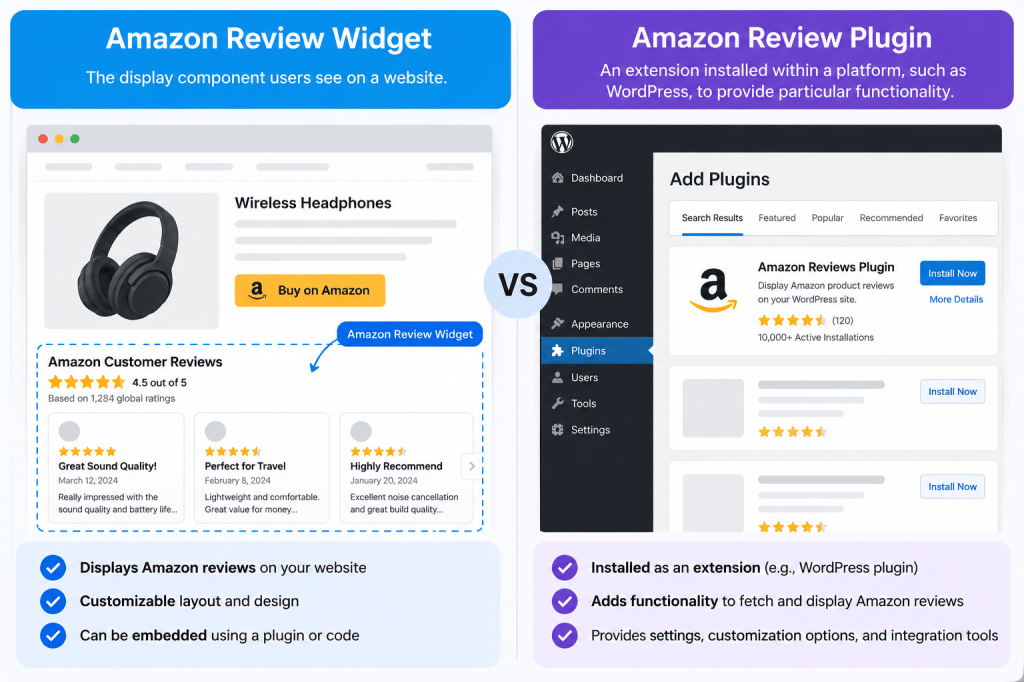
A solution may provide a standalone widget, a plugin, an app, or several integration options.
When comparing an Amazon review plugin with an embedded widget, evaluate website compatibility, setup requirements, customization, performance, data access, and ongoing maintenance.
Who Should Use an Amazon Reviews Widget?
An Amazon reviews widget may be useful for:
- Ecommerce businesses that sells on Amazon and their website too.
- Amazon affiliates who create product comparisons and buying guides.
- Publishers and bloggers who write about products and their features.
- Website owners who want to supplement product descriptions with customer feedback.
- Developers and marketers who manage product-focused landing pages.
In each case, the review display should be relevant to the page, accurate, and permitted under the applicable data-use requirements.
Why Display Amazon Reviews on Your Website?
Customer feedback can provide additional context when visitors evaluate products. When used appropriately, review information can complement product descriptions, specifications, and independent editorial analysis.
Help Visitors Evaluate Products
Product descriptions explain a product’s features, but customer reviews may provide additional perspectives about its practical use.
Displaying permitted review information near relevant product content can help visitors find that information without navigating away immediately.
The benefit depends on the relevance, accuracy, and presentation of the content. A review widget alone does not guarantee increased conversions or customer trust.
Add Product Feedback to Relevant Pages
An Amazon reviews widget may be suitable for product detail pages, product comparison pages, and editorial buying guides.
For example, an article comparing several headphones may link readers to the original Amazon listings, where they can review product details and customer feedback.
The displayed information must correspond to the correct product. Reviews from an unrelated listing can confuse visitors and undermine confidence in the page.
Connect Visitors With Original Product Information
Where permitted and supported, links to original Amazon product pages or reviews can help visitors explore the underlying information.
Clear source attribution also helps distinguish third-party review content from an independent assessment published by the website itself.
Key Features to Look for in an Amazon Review Widget
Not all Amazon review widgets offer the same capabilities. Evaluate the following features before choosing a solution.
Customizable Review Layouts
Different websites require different presentation styles. Review cards may suit a compact product page, while grids or carousels may work better in wider content sections.
Check whether the tool supports different layouts, controls over the number of reviews displayed, and adjustments to spacing or content density.
Choose a layout that keeps reviews easy to read without distracting visitors from the primary page content.
Simple Amazon Reviews Integration
The Amazon reviews integration process is one of the most important factors to evaluate.
Check what information, account permissions, product identifiers, or credentials are required. Confirm that the tool uses an approved access method and explain any relevant eligibility requirements before committing to the implementation.
Be cautious of services that cannot explain where their review data comes from or how its use complies with applicable requirements.
Appearance and Branding Controls
Customization can help an Amazon review widget fit naturally into a website’s visual design.
Depending on the tool, useful settings may include:
- Colors, typography, and spacing.
- Review card layouts and display styles.
- The number of review items displayed.
- Available link and content-display options.
- Custom CSS or advanced styling controls.
Verify that each advertised feature is available in the relevant plan before including it in a product comparison.
Review Filtering and Moderation
Some solutions offer controls for selecting or filtering which review information appears on a website.
Understand what these controls actually do. Filtering the website display is not the same as editing or moderating reviews on Amazon itself.
Any selection or filtering must comply with applicable source terms and must not misrepresent the underlying feedback.
Responsive and Mobile-Friendly Design
An Amazon review widget should remain readable across desktop, tablet, and mobile screens.
Check font sizes, text wrapping, spacing, scrolling behavior, and interactive elements. Ensure visitors can access source links and other controls on smaller screens.
Use a mobile preview where available, then test the published implementation on actual devices.
Automatic Updates and Display Limits
Amazon review widgets may differ in how frequently they refresh, how much information they display, and whether usage limits apply.
Before selecting a solution, verify:
- Whether content refreshes automatically.
- How frequently the displayed information may change.
- Whether the number of products or reviews is limited.
- Whether usage depends on a subscription or account eligibility.
- What happens when the source becomes unavailable.
Do not assume that every widget provides real-time updates.
Website Performance and Compatibility
Third-party widgets can introduce additional scripts, network requests, or layout changes that affect page performance.
Check compatibility with your website platform, theme, and other installed extensions. Test loading behavior, responsive display, accessibility, and layout stability before deploying the widget across multiple pages.
How to Add Amazon Reviews to Your Website
The exact installation process depends on your chosen tool, website platform, and permitted review source. The following steps describe a general workflow rather than a universal method.
Step 1 – Choose a Suitable Amazon Review Plugin or Widget
Compare available options based on source permissions, supported platforms, customization, performance, pricing, and documentation.
Confirm that the selected solution supports the review source and intended use case before beginning installation.
Step 2 – Connect an Eligible Review Source
Follow the provider’s instructions for obtaining or connecting permitted Amazon review information.
Depending on the applicable program and integration, access may require an eligible account, API registration, or approved credentials.
Installing an Amazon review plugin does not automatically provide permission to reuse reviews. Verify both the access method and the intended display.
Step 3 – Customize the Amazon Review Widget
Select an appropriate layout and configure the available appearance settings.
Confirm that the displayed information corresponds to the relevant product and that reviews, ratings, and other details are represented accurately.
Step 4 – Preview the Review Display
If the tool offers a preview, use it to check:
- Whether the correct product and review information appear.
- Whether the text and other displayed details are accurate.
- Whether source links work as expected.
- Whether the design remains readable on mobile screens.
- Whether the widget introduces unwanted spacing or layout problems.
A preview is a useful first check, but it does not replace testing the published page.
Step 5 – Generate and Copy the Embed Code
If the selected solution supports embed-code installation, follow its instructions to generate and copy the code.
Keep the code intact unless the provider documents a supported customization method. Incorrect modifications can prevent the widget from working.
Some integrations use an app or plugin instead of a manual embed code, so follow the method supported by the selected solution.
Step 6 – Add the Widget to Your Website
Insert the widget using the installation method supported by your platform.
This may involve a page editor, an HTML block, a compatible plugin, a platform app, or a designated code insertion area.
Follow the platform’s current instructions rather than assuming the same process will work everywhere.
Step 7 – Test the Published Widget
After publishing, verify the widget on the live page.
Test it on desktop and mobile, check source links, confirm that the display remains accessible, and monitor loading performance.
If reviews are missing or outdated, investigate the source connection, account permissions, update process, and provider documentation.
How to Add Amazon Reviews to WordPress
An Amazon review plugin for WordPress may offer a platform-specific installation method, while other solutions may use an embedded widget.
Before selecting an Amazon review plugin for WordPress, verify its current compatibility, installation requirements, maintenance status, data source, and permissions.
Depending on the solution, the installation process may involve:
- Selecting a compatible plugin or widget.
- Connecting a permitted review source.
- Configuring the widget’s layout and display settings.
- Adding it to the appropriate page or template.
- Testing the published result on desktop and mobile.
The exact steps depend on the selected tool, theme, editor, and any relevant page-builder extensions.
A WordPress plugin should not be considered suitable solely because it advertises Amazon reviews. Verify how it accesses and displays review information.
How to Display Amazon Reviews on WooCommerce
WooCommerce runs on WordPress, but the integration may also need to account for product templates and store-specific layouts.
Check whether the selected solution supports the required product-page placement and whether it works with the active theme.
Test the widget to ensure that it does not interfere with product descriptions, purchase controls, page layout, or mobile usability. Plugins like Taggbox works best for embedding amazon reviews on a WooCommerce website.
How to Embed Amazon Reviews on Shopify, Wix, Squarespace, or a Custom Website
The method used to embed Amazon reviews depends on the website platform and the available integration.
Shopify
Check whether the selected solution offers a supported Shopify app or embedding method. Verify storefront compatibility, intended placement, and mobile presentation. Best social proof widgets let you import amazon reviews on shopify really easily!
Wix and Squarespace
Follow the platform’s current instructions for adding supported external content or embed code. Some integrations may have restrictions on scripts, functionality, or placement.
Custom HTML Websites
A developer may need to insert the supported embed code into the relevant part of the page. Check that scripts load correctly, do not conflict with other components, and behave properly across screen sizes.
In every case, test the live page rather than relying exclusively on the editor preview.
How to Choose the Best Amazon Reviews Widget or Plugin
The best solution is the one that meets your practical requirements while providing a reliable and appropriately authorized implementation.
| Evaluation criterion | What to check |
|---|---|
| Source and permissions | How review information is obtained and whether the intended use is permitted. |
| Platform compatibility | Whether the tool supports the website and required installation method. |
| Customization | Available layouts, styling, filtering, and display controls. |
| Update behavior | How frequently content refreshes and what limitations apply. |
| Pricing | Subscription costs, usage limits, and included features. |
| Performance | Loading behavior, additional scripts, and mobile experience. |
| Documentation | Setup instructions and troubleshooting resources. |
| Support | How installation and source-connection problems are handled. |
Compare current product documentation rather than relying exclusively on promotional statements.
A clear comparison based on verified capabilities is more useful than unsupported claims about which solution is the best or fastest.
Important Considerations Before Displaying Amazon Reviews
Having the technical ability to build a widget does not automatically establish permission to reproduce Amazon review content.
Can You Use Amazon Reviews on Your Website?
The answer depends on the applicable Amazon terms, the review source, the access method, and the purpose of displaying the information.
Amazon’s Associates policies contain specific restrictions on using customer reviews and star ratings. For example, Amazon India’s current Associates Program Participation Requirements state that Associates must obtain a link to the customer review or star rating through the Product Advertising API and comply with the relevant license requirements before displaying or using that information on their sites.
API availability, terminology, eligibility, and requirements can differ by program and marketplace. Consult the official requirements that apply to your use case. Amazon’s Creators API onboarding documentation describes access requirements for that API in the applicable program.
Do not assume that manually copying reviews, scraping Amazon pages, or installing a third-party review aggregator plugin automatically grants permission to reuse the content. Where necessary, seek qualified legal guidance.
How to Verify Review Accuracy and Source Attribution
Before publishing reviews, verify that they correspond to the correct product and have not been changed in a way that misrepresents the original feedback.
Check the source, available attribution, and behavior of links to the original listing or review.
If the widget refreshes content automatically, establish how updates work and what happens when a review becomes unavailable.
Review Display and Customer Expectations
Review content should help visitors evaluate a product without misleading them.
Do not imply that selected reviews represent every buyer’s experience. Do not present third-party feedback as a testimonial from your own customers unless that attribution is accurate.
Where appropriate, help visitors distinguish the original source from commentary or analysis published by the website.
SEO Considerations for Embedded Reviews
Embedding an Amazon reviews widget does not guarantee higher search rankings, additional organic traffic, or review stars in Google Search.
The overall page should provide useful, accurate information and a good user experience. Consider accessibility, mobile usability, content quality, and the performance impact of third-party scripts.
Google’s helpful, reliable, people-first content guidance provides a framework for evaluating whether a page genuinely serves its audience.
Structured data must describe the content it actually represents. Amazon product ratings should not be used to represent ratings for a separate software product or widget. Follow Google’s review snippet requirements and Product structured data guidelines where applicable.
Amazon Reviews Widget vs. Amazon Product Embedding
Displaying Amazon reviews is different from displaying Amazon products or an entire Amazon storefront.
An Amazon reviews widget focuses on permitted review information associated with products. Product embedding focuses on product-related information and links, while storefront embedding involves presenting or linking to a collection of products.
These requirements can involve different tools, permissions, and implementation methods.
If your goal is to add Amazon products to WordPress, display Amazon products on your website, or embed an Amazon store in WordPress, use a dedicated product-embedding guide rather than treating those tasks as identical to embedding customer reviews.
FAQs About Amazon Reviews Widgets
What Is an Amazon Reviews Widget?
An Amazon reviews widget is a website component that displays eligible review information associated with Amazon products. Depending on the solution, it may support different layouts, styling options, and installation methods.
Can I Display Amazon Reviews on My Website?
Potentially, but permission depends on the applicable Amazon terms, the review source, the access method, and the intended use. Check the requirements for the relevant marketplace and program before publishing reviews.
How Do I Embed Amazon Reviews on My Website?
The general process is to select a suitable Amazon reviews widget like Taggbox, connect an eligible review source, configure the display, install it using a supported method, and test the published page. Exact steps vary by provider and website platform.
Is There an Amazon Reviews Plugin for WordPress?
Yes, Some solutions offer WordPress plugins, while others use embedded widgets or alternative integrations. Check current installation documentation, compatibility, data sources, and applicable permissions before selecting a plugin.
Can I Add Amazon Reviews to Shopify or WooCommerce?
The available options depend on the selected solution and its current platform support. Verify compatibility and test the published display before relying on it in a live store.
Do Amazon Review Widgets Update Automatically?
Some solutions offer automatic refresh, while others have different update processes or usage limits. Check the provider’s documentation for refresh frequency, source availability, and account requirements.
Can I Customize the Appearance of Amazon Reviews?
Many widgets offer some degree of customization, but the available controls vary. Depending on the solution, you may be able to change layouts, colors, typography, spacing, or other display settings.
Can an Amazon Reviews Widget Improve SEO?
A widget may complement useful product information, but embedding Amazon reviews does not guarantee higher rankings, more organic traffic, or review stars in Google Search. The overall page quality, accessibility, and performance remain important.
How Can I Display Amazon Products on My Website?
Displaying Amazon products is a different task from displaying Amazon customer reviews. Product-display options depend on the supported integration method, the website platform, and the applicable Amazon terms. Consult a dedicated product-embedding guide for the relevant instructions.
Get Started With an Amazon Reviews Widget
An Amazon reviews widget can help present relevant product feedback alongside website content, provided the implementation is accurate, appropriate, and compliant with applicable requirements.
Before choosing a solution, compare its review source, platform compatibility, customization options, update behavior, pricing, and performance. Test the setup process and verify that the information displayed matches the intended product.
Ready to display Amazon product feedback on your website? Explore available widget options, compare their capabilities, and test the setup process. Confirm source permissions and platform compatibility before publishing.
Primary CTA: Explore Widget Options
Secondary CTA: Read the Setup Guide









Leave a Reply