A WordPress social media wall plugin brings content from multiple social networks into one live feed on your website, allowing visitors to see your latest Instagram, Facebook, X, TikTok, YouTube, and other social content without leaving your site. Popular options in 2026 include Smash Balloon Social Wall, Taggbox, Tagembed, Juicer, Curator, EmbedSocial, Flow-Flow Social Stream, and Elfsight.
The right plugin depends on what you need: a simple social feed, multiple social networks in one wall, UGC moderation, design flexibility, reviews, or a solution that can work across several websites. In this guide, we compare the leading WordPress social media wall plugins based on supported networks, ease of setup, customization, moderation, pricing, and practical use cases.
What Is a Social Media Wall Plugin?
A social media wall plugin for WordPress collects content from one or more social media platforms and displays it as a unified feed on your website.
Instead of creating separate sections for Instagram, Facebook, YouTube, TikTok, and X, a social wall can bring selected content together into one continuously updated display.
Depending on the plugin, you may be able to connect accounts, hashtags, mentions, pages, channels, or other supported sources. Many tools also provide moderation and customization features so you can control which posts appear and how the wall looks.
For example, Taggbox’s WordPress solution lets users collect social content, customize the display, moderate posts, and publish the resulting widget through WordPress using a plugin, shortcode, Gutenberg block, or embed code.
Social Wall vs. a Single Social Media Feed — What’s the Difference?
A social media feed normally focuses on one source or network. For example, an Instagram feed might display posts from one Instagram account.
A social wall is broader. It can combine content from multiple social networks into a single display.
For example:
Single social feed:
Instagram → Instagram posts → WordPress website
Social wall:
Instagram + Facebook + TikTok + YouTube + X → One combined social wall → WordPress website
This makes a social wall particularly useful for brands that are active across several channels, events collecting hashtag content, UGC campaigns, and websites that want to showcase social proof.
How We Compared These WordPress Social Wall Plugins
Rather than treating every plugin as interchangeable, we compared them using the review methadology and factors that matter when choosing a WordPress social wall plugin:
- Supported social networks: How many platforms and source types can be connected?
- Ease of setup: Can a WordPress user create and publish a wall without coding?
- Customization: Are layouts, colors, spacing, themes, and CSS controls available?
- Moderation: Can unwanted, irrelevant, or inappropriate content be removed?
- Update frequency: How frequently does the connected content refresh?
- Pricing: Is there a free plan, and what limitations apply?
- WordPress compatibility: Can the feed be added through a plugin, shortcode, block, or common page builders?
- Additional functionality: Does the platform provide reviews, UGC, analytics, shoppable content, or other features?
One important limitation is that feature availability and pricing can change as vendors update their products. The prices below reflect the product information available when this guide was prepared and should be checked on the vendor’s pricing page before purchase.
Quick-Glance Comparison: Best Social Media Wall Plugins for WordPress
| Plugin | Best for | Free option | Paid starting point* |
|---|---|---|---|
| Smash Balloon Social Wall | WordPress-focused social feeds | No free Social Wall plugin | From $199 for Social Wall; bundle currently listed at $299/year |
| Taggbox | Marketing teams & UGC campaigns | Yes | From $19/month |
| Tagembed | Beginners and multi-source widgets | Yes | From $29/month on annual pricing |
| Juicer | Social aggregation | Yes | From $15/month |
| Curator.io | Feed customization | Yes | From $23/month |
| EmbedSocial | Social posts + reviews | Yes | From €29/month |
| Flow-Flow Social Stream | Advanced WordPress customization | No free version indicated | $59 one-time on CodeCanyon |
| Elfsight | No-code cloud widgets | Yes | From $8/month when billed annually for Social Feed |
*Pricing can change, and plans may have different limits for sources, views, websites, or features. For example, Taggbox currently lists a free plan with 500 monthly views and paid plans beginning at $19/month, while Juicer lists a free plan and paid plans beginning at $15/month.
Best WordPress Social Media Wall Plugins for 2026
1. Smash Balloon Social Wall — Best for WordPress-Focused Social Feeds
Smash Balloon is a WordPress-focused social feed ecosystem with separate plugins for platforms such as Facebook, Instagram, X, YouTube, TikTok, and reviews. Its Social Wall product is designed to combine feeds from multiple social sources into one display.
The company’s current All Access package includes its social feed plugins and Social Wall, allowing users to combine different social feeds in one display. The current listed introductory price for the All Access Bundle is $299/year, with renewal at $598/year.
Best for: WordPress users who want a dedicated WordPress social-feed ecosystem.
Key strengths:
- Multiple dedicated social feed plugins
- Social Wall for combining different social sources
- WordPress-native approach
- Feed caching and dynamic loading
- Multiple layout and customization options
- Analytics available through the All Access package
Smash Balloon says its plugins cache retrieved social data to reduce requests and dynamically load data as needed. That makes caching an important consideration when evaluating any social feed plugin for a performance-sensitive WordPress site.
Potential limitation: Smash Balloon’s product structure can be more suitable for users who specifically want its ecosystem of WordPress plugins rather than a broader website widget platform.
2. Taggbox — Best for Marketing Teams & UGC Campaigns
Taggbox is an all-in-one social widget and UGC platform that can be used to create social media feeds and walls for websites, including WordPress sites.
Its WordPress plugin allows users to manage social media widgets from WordPress and publish them using a shortcode or Gutenberg block. Taggbox also supports an embed-code method for users who prefer not to install the plugin.
This makes Taggbox a strong option for marketing teams that want more than a basic social feed.
The platform supports social media feeds, reviews, UGC, and shoppable experiences. Its current WordPress page lists support for 25+ platforms and features such as moderation, multiple layouts, custom CSS, and responsive display.
Taggbox’s current widget pricing includes a free plan with one feed, 500 monthly views, 10+ platforms, manual moderation, and updates every four days. Paid plans currently start at $19/month for the Starter plan.
Best for: Marketing teams, UGC campaigns, brands using social proof, and businesses that want social feeds alongside reviews and shoppable content.
Key strengths:
- WordPress plugin
- Social feeds and UGC
- Review widgets
- Multiple layouts
- Moderation
- Custom CSS
- Shoppable widgets
- Analytics
- Gutenberg and Elementor compatibility
- Free plan available
A particularly useful feature for marketers is the ability to combine social content with other customer-generated content instead of treating the social feed as an isolated website element.
Potential limitation: The free plan has relatively low usage limits, including 500 monthly views and updates every four days, so websites with higher traffic or a need for more frequent updates may need a paid plan.
3. Tagembed — Best Beginner-Friendly Option
Tagembed is another widget-based platform that supports social media feeds and other content sources.
Its current free plan includes one feed, 500 monthly views, more than 10 supported platforms, unlimited websites, manual moderation, and updates every four days. Paid plans add more feeds, higher view limits, additional platforms, faster updates, automatic moderation, CDN caching, and other features.
Best for: Beginners who want to experiment with social feeds and other content widgets without immediately paying for a subscription.
Key strengths:
- Free plan
- Multiple social and review sources
- Website widgets
- Moderation
- Multiple themes
- CDN caching on paid plans
- Review collection
- Shoppable widget functionality on applicable plans
Tagembed can also be useful when your WordPress website needs more than social content because its platform includes sources such as Google, Yelp, Airbnb, Amazon, Tripadvisor, RSS, TikTok, YouTube, and other sources.
Potential limitation: The free plan has restrictions on feeds, views, update frequency, and available features.
4. Juicer — Best Free Social Aggregator
Juicer focuses heavily on social media aggregation. Its WordPress integration allows users to connect social accounts, create a unified feed, and display it using a shortcode.
Juicer says its WordPress plugin is free and supports 15+ social platforms. Its current free plan includes one source, one feed, 300 monthly views, and a 24-hour refresh rate. Paid plans increase the number of sources, views, and update frequency.
Best for: Websites looking for a straightforward social aggregation solution with a usable free tier.
Key strengths:
- Official WordPress plugin
- 15+ platforms
- Shortcode support
- Moderation
- Responsive feeds
- Free plan
- Elementor compatibility
- Multiple source types
Juicer also provides moderation features that allow users to filter content by keywords and approve or remove posts before they appear on the wall.
Potential limitation: The free plan is restricted to one source and 300 monthly views, so larger websites may quickly need a paid plan.
5. Curator.io — Best for Feed Customization
Curator is a social media aggregation platform designed to collect and display content from different sources.
Its current free plan includes three sources, updates every 24 hours, 2,000 monthly views, and up to 1,000 posts. Its Pro plan currently starts at $23/month and increases the number of sources and update frequency while providing additional control over branding.
Best for: Businesses that want control over how aggregated social content looks on their website.
Key strengths:
- Free plan
- Multiple sources
- Feed customization
- Branding controls
- Faster updates on paid plans
- WordPress-friendly embedding
Curator’s pricing structure is based partly on sources and monthly views, so it is important to estimate your website traffic before selecting a plan.
Potential limitation: The free plan has a 24-hour update interval, which may not be appropriate when your use case requires frequent content refreshes.
6. EmbedSocial — Best for Combining Reviews + Social Posts
EmbedSocial takes a broader approach than a conventional social wall plugin by combining social media widgets with review and UGC functionality.
Its current free plan supports one source and 500 monthly views. Paid plans increase the number of sources and views and add platforms and features such as LinkedIn, YouTube, X, social listening, advanced analytics, and API access depending on the plan.
Best for: Businesses that want social media feeds and customer reviews within the same broader widget ecosystem.
Key strengths:
- Social media widgets
- Review widgets
- TikTok
- YouTube
- X on higher plans
- Social listening
- Analytics
- API access on higher plans
EmbedSocial’s current pricing starts at €29/month for its Pro plan after the free tier.
Potential limitation: Some important sources and advanced capabilities are restricted to higher plans.
7. Flow-Flow Social Stream — Best for Advanced Customization
Flow-Flow Social Stream is a WordPress social stream plugin sold through CodeCanyon.
The current product listing shows a $59 purchase price and describes it as a WordPress social media wall plugin that can combine feeds from multiple networks. It supports networks and sources including Instagram, Facebook, TikTok, YouTube, LinkedIn, X, Pinterest, SoundCloud, Flickr, Vimeo, RSS, and WordPress content, depending on the source and integration.
Best for: WordPress users who want a highly configurable social stream and are comfortable working with a standalone WordPress plugin.
Key strengths:
- Multiple social networks
- Combined or individual feeds
- Responsive layouts
- Moderation
- Keyword-based filtering
- WordPress integration
- Page-builder compatibility
- One-time purchase model
The CodeCanyon listing also shows compatibility with Elementor, Elementor Pro, WooCommerce, and WPBakery Page Builder.
Potential limitation: Unlike SaaS-based platforms, the plugin’s setup and maintenance model may be better suited to WordPress users who prefer managing a plugin directly.
8. Elfsight — Best Cloud-Widget / No-Code Option
Elfsight provides cloud-based widgets that can be embedded into websites without building the functionality from scratch.
Its Social Feed product has a free plan and paid plans based on widget limits and monthly views. The current pricing information lists a free Social Feed plan with 200 monthly views and one widget. The Basic plan is currently listed at $8/month when billed annually and allows 5,000 monthly views and three widgets.
Best for: Users who prefer a no-code widget platform instead of managing a complex WordPress plugin.
Key strengths:
- No-code setup
- Free plan
- Cloud-hosted widgets
- Multiple widget instances
- Customization
- Installation assistance
- Higher plans for higher traffic
Potential limitation: Pricing is tied to widget and view limits, and the cloud-widget model may not be ideal for every WordPress site owner.
The Easiest Social Wall Plugin for WordPress in 2026
If your priority is ease of setup rather than advanced technical customization, look for a plugin that handles collection, moderation, customization, and publishing through a simple workflow.
Taggbox social feeds plugin , for example, provides a WordPress plugin that lets you connect sources, customize a feed, moderate content, and publish the widget using a shortcode or Gutenberg block. Its documentation also provides a dashboard-based installation process rather than requiring users to manually build the feed.
Juicer follows a similarly straightforward workflow: create a feed, connect your social accounts, install the WordPress plugin, and add the social media feed widget on wordpress site.
For a basic WordPress website, the easiest option is therefore likely to be the one that matches your existing workflow:
- Want everything inside WordPress? Consider a WordPress-focused plugin such as Smash Balloon or Flow-Flow.
- Want social feeds plus UGC and reviews? Consider Taggbox or EmbedSocial.
- Want a simple free social aggregator? Consider Juicer.
- Want a cloud-based no-code widget? Consider Elfsight.
- Want multiple types of content sources? Tagembed is another option.
How to Add a Social Wall to Your WordPress Site
The exact process varies by plugin, but the workflow is generally similar.
Step 1: Choose Your Plugin and Install It
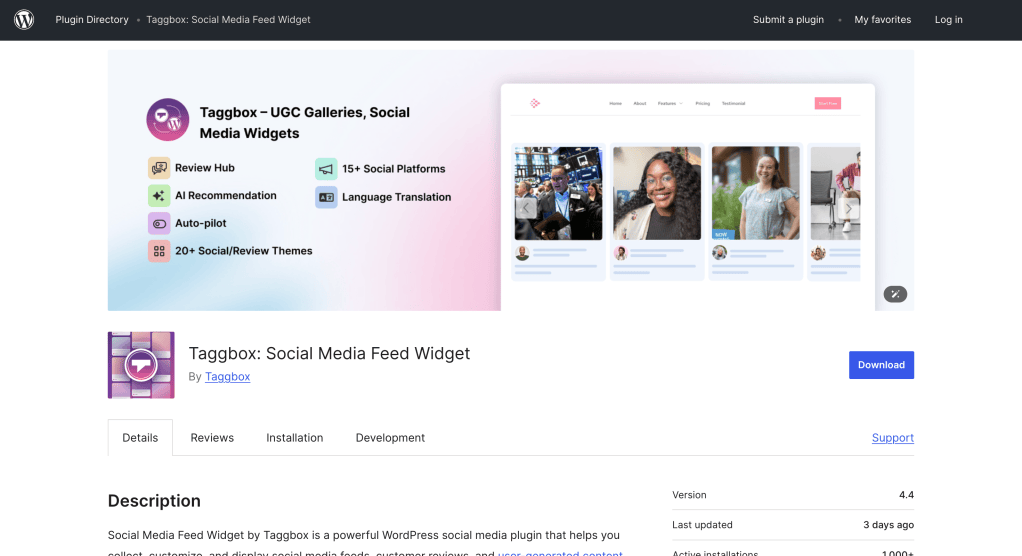
Start by selecting a social wall plugin based on your required platforms, traffic, features, and budget.
If you choose a WordPress plugin such as Taggbox, you can install it directly from the WordPress dashboard.
For Taggbox:
WordPress Dashboard → Plugins → Add New Plugin → Search for Taggbox Widget → Install → Activate
Taggbox’s documentation confirms that the plugin can be installed directly through the WordPress dashboard or uploaded manually as a ZIP file.
Step 2: Connect Your Social Accounts
After activating the plugin, connect the social sources you want to display.
Depending on the platform, this might include:
- YouTube
- TikTok
- X
- Hashtags
- Mentions
- Reviews
- RSS feeds
The available source types depend on the plugin and the permissions/API access provided by each social network.
Step 3: Customize Your Wall’s Layout
Choose how your content should appear.
Common layouts include:
- Grid
- Masonry
- Slider
- Carousel
- Cards
- Reels-style layouts
- Horizontal feeds
- Collages
Also adjust colors, fonts, spacing, post sizes, and other visual elements where the plugin allows it.
Taggbox currently lists multiple ready-to-use layouts and customization options including fonts, colors, spacing, and custom CSS.
Step 4: Embed the Wall on a Page or Post
Once the feed looks right, add it to your WordPress website.
Depending on your plugin, you may use:
- Gutenberg block
- Shortcode
- Elementor widget
- Custom HTML
- Embed code
For example, Taggbox supports publishing through a WordPress shortcode or Gutenberg block, while also offering a standard embed-code option.
Step 5: Moderate and Publish
Before sending visitors to the page, review the content that will appear on your social wall.
Moderation is especially important when using:
- Hashtags
- Mentions
- User-generated content
- Public posts
- Campaign content
Look for features such as keyword filtering, manual approval, spam filtering, duplicate removal, or AI-assisted moderation.
Free vs. Paid Social Wall Plugins: What You Actually Get
A free social wall plugin can be enough for a personal website or a small test project. However, free plans often have restrictions.
What’s Usually Free
Free plans commonly provide:
- One feed or source
- Basic layouts
- Limited monthly views
- Slower updates
- Basic moderation
- Plugin or platform branding
- Limited customization
For example, Taggbox currently lists a free plan with one feed, 500 monthly views, 10+ platforms, manual moderation, and updates every four days.
Juicer’s free plan currently includes one source, one feed, 300 monthly views, and a 24-hour refresh rate.
What’s Usually Gated Behind a Paid Plan
Paid plans commonly add:
- More social sources
- Higher monthly view limits
- Faster updates
- More feeds
- Advanced moderation
- Removal of branding
- Custom CSS
- Analytics
- Additional layouts
- API access
- Team functionality
- UGC features
- Shoppable content
The important point is that “free” does not necessarily mean unlimited. Check the source limit, monthly views, refresh interval, and branding before choosing a free plan.
Does a Social Wall Plugin Slow Down Your WordPress Site?
It can, depending on how the feed is implemented, how much content is loaded, and how the plugin handles caching and rendering.
A social wall may involve external requests, images, videos, JavaScript, and dynamic content. Loading a large number of high-resolution posts at once can therefore affect page performance.
Look for features such as:
- Caching
- Lazy loading
- Pagination
- Limited initial post loading
- CDN delivery
- Optimized images
- Dynamic loading
For example, Smash Balloon says its plugins cache retrieved social data to reduce requests and dynamically load data as needed.
Tagembed also lists CDN caching as a feature on paid plans.
Caching, Lazy-Loading, and Core Web Vitals
When adding a social wall, don’t judge performance only by whether the feed appears quickly in your browser.
Check your page’s Core Web Vitals, particularly:
- LCP: Largest Contentful Paint
- INP: Interaction to Next Paint
- CLS: Cumulative Layout Shift
A practical approach is to compare the page before and after installing the social wall and monitor real-world performance rather than assuming that a plugin is automatically “fast” or “slow.”
Also make sure the widget has defined dimensions where possible. This can help prevent content from shifting when the feed loads.
Frequently Asked Questions
What is a social media wall plugin?
A social media wall plugin collects content from supported social media sources and displays it as a unified feed on a WordPress website. Depending on the plugin, you can combine multiple networks, moderate content, customize the design, and publish the wall using a shortcode, block, widget, or embed code.
Is there a free social wall plugin for WordPress?
Yes. Several social wall and social feed platforms offer free plans. Taggbox, Tagembed, Juicer, Curator, EmbedSocial, and Elfsight currently provide free options, although their limits differ. Free plans commonly restrict sources, views, update frequency, or advanced features.
What’s the difference between a social wall and a social media feed plugin?
A social media feed can focus on content from one platform or source, while a social wall generally combines content from multiple social networks or sources into one display. A social wall is therefore useful when you want Instagram, Facebook, YouTube, TikTok, X, or other content presented together.
How do I add a social wall to WordPress without coding?
Install a compatible WordPress plugin, connect your social sources, customize the feed, and add the resulting widget using the plugin’s Gutenberg block, shortcode, page-builder widget, or embed method. Taggbox, for example, supports a WordPress plugin, shortcode, Gutenberg block, and embed-code workflow.
Does a social wall plugin slow down my WordPress site?
A social wall can affect performance if it loads too much external content or large media files. Look for caching, lazy loading, optimized images, CDN delivery, and controlled initial loading. Test the actual page’s Core Web Vitals before and after implementation rather than relying only on marketing claims.
Can one plugin show feeds from multiple social networks at once?
Yes. Several tools in this comparison support multiple social networks in a combined feed. Taggbox, for example, supports content from multiple platforms and allows different sources to be managed within its widget platform. Juicer also supports combining content from multiple networks into one feed.
Our Verdict: Which Social Media Wall Plugin Should You Choose?
There isn’t one social wall plugin that is ideal for every WordPress website. The right choice depends on the type of content you want to display and how much control you need.
Choose Smash Balloon if your priority is a WordPress-focused ecosystem for social feeds and you want its dedicated plugins and Social Wall functionality.
Choose Taggbox if you’re a marketing team or brand that wants social feeds alongside UGC, reviews, moderation, customization, analytics, and shoppable content. Its dedicated WordPress plugin also makes publishing the widget directly from WordPress straightforward.
Choose Tagembed if you want a beginner-friendly widget platform with social, review, and other content sources.
Choose Juicer if you’re primarily looking for a social media aggregator with a straightforward free WordPress integration.
Choose Curator.io if feed customization and source management are important to you.
Choose EmbedSocial if combining social content with reviews and other reputation-focused widgets is part of your strategy.
Choose Flow-Flow if you prefer a standalone WordPress plugin and want extensive customization options.
Choose Elfsight if you prefer a cloud-based, no-code widget model.
Before installing any plugin, check four things: supported sources, update frequency, monthly view limits, and performance impact. Those details will have a bigger practical impact on your website than the number of features listed on a product page.
Ready to Build Your WordPress Social Wall?
Start by identifying the social networks and content types you actually need. If you need Instagram, Facebook, TikTok, YouTube, LinkedIn, reviews, UGC, and other content in a single marketing workflow, a multi-source platform such as Taggbox can be worth considering.
If you only need one social network, a specialized plugin may be simpler and more cost-effective.
The best social wall is ultimately the one that gives you the sources, moderation controls, design flexibility, update frequency, and performance your WordPress website actually requires.











Leave a Reply