What are the best social media widgets for 2026? The strongest options are Taggbox, SocialableKIT, EmbedSocial, Smash Balloon, and elfsight. The right choice depends on whether you need multi-platform aggregation, Instagram or TikTok feeds, WordPress integration, user-generated content, reviews, or conversion-focused social proof.
Social media widgets have moved beyond simple Instagram galleries or embedding facebook feeds on websites.
A well-implemented social widget can bring Instagram posts, TikTok videos, customer reviews, YouTube content, branded hashtags, and other social content directly onto your website.
For businesses, publishers, event companies, ecommerce stores, and marketers, that creates three major opportunities: stronger engagement, more visible social proof, and better conversion paths.
However, not every widget is suitable for every website.
Here are five of the best social media widgets for 2026, compared by capabilities, pricing, platform support, and ideal use case.
Best Social Media Widgets 2026 – Quick Comparison
| Tool | Best For | Platform Support | Starting Price* | WordPress |
|---|---|---|---|---|
| Juicer | Multi-platform social aggregation | Instagram, Facebook, LinkedIn, X, TikTok, YouTube, Pinterest, Reddit and more | $15/month | Yes |
| EmbedSocial | UGC, social proof and shoppable feeds | Instagram, TikTok, Facebook, YouTube, LinkedIn, Threads, X, Google and more | €29/month | Yes |
| Taggbox | UGC campaigns and social walls | 15+ platforms depending on plan | FREE | Yes |
| Smash Balloon | WordPress social feeds | Instagram, Facebook, X, YouTube, TikTok and reviews | $49/year for individual Pro plugins | WordPress-focused |
| WP Social Ninja | WordPress feeds, reviews and chat | Instagram, Facebook, X, YouTube, TikTok plus review platforms | $71/year | WordPress-only |
*Free plans or limited free versions are available for several products. Pricing can change, so check the vendor before purchasing. Juicer currently lists Lite at $15/month, Taggbox Starts FREE, EmbedSocial Pro at €29/month, and WP Social Ninja’s standard single-site annual license at $71/year.
Top Social Media Feed Widgets
We have used our review methodology and used the widgets for at least 14 days before writing the review.
1. Juicer

Juicer is one of the strongest social media aggregator tools for businesses that need to combine content from several social networks into one branded feed.
It supports sources including Instagram, Facebook, LinkedIn, X, YouTube, Pinterest, Tumblr, Vimeo, TikTok, Reddit and RSS-based sources.
Best Use Cases
Juicer works particularly well for:
- Conferences and event social walls
- Branded hashtag campaigns
- Corporate websites
- Universities and communities
- Multi-platform content hubs
- Campaign landing pages
Pros
- Broad platform coverage
- Multi-network aggregation
- Hashtag and account-based feeds
- Useful moderation options
- Can be embedded outside WordPress
- Suitable for large social walls
Juicer also supports brand mention sources across Instagram, Facebook, LinkedIn and X, which can be useful when building UGC and social-proof campaigns.
Cons
- Higher-volume websites may require more expensive plans
- Some social content is limited by individual network APIs
- Free plan has limited views and sources
Pricing
Juicer offers a free plan. Its Lite plan is currently $15/month, Starter is $25/month, Pro is $99/month, and Enterprise pricing starts with a $199 monthly minimum.
2. EmbedSocial

EmbedSocial is a strong choice when the objective is not simply displaying posts but turning social content into UGC, reviews, social proof and shoppable experiences.
It can pull content from Instagram, TikTok, Facebook, YouTube, Threads, LinkedIn, Google, X, Pinterest and other sources. It also supports website builders and ecommerce platforms including WordPress, Shopify, Wix, Webflow, Squarespace, Magento and others.
Best Use Cases
Consider EmbedSocial for:
- Ecommerce product pages
- Instagram and TikTok galleries
- Customer-review sections
- UGC campaigns
- Shoppable social feeds
- Multi-location businesses
Pros
- Strong UGC functionality
- Wide CMS compatibility
- Review widgets
- Shoppable layouts
- Multiple customizable widget formats
- Supports major visual social networks
Cons
- Source and monthly-view limits vary significantly by plan
- Advanced platform support requires higher plans
- Larger campaigns can become relatively expensive
Pricing
EmbedSocial currently offers a free tier with one source and 500 monthly views.
Paid plans start with Pro at €29/month, followed by Pro Plus at €49/month and Premium at €99/month when billed monthly.
3. Taggbox

Taggbox is particularly effective for businesses that want to collect social content and use it as conversion-focused UGC.
It can combine content from multiple networks into social feeds, hashtag walls and website widgets.
Best Use Cases
Taggbox is useful for:
- Ecommerce UGC
- Event social walls
- Instagram hashtag feeds
- Testimonial displays
- Campaign microsites
- Product-page social proof
Pros
- Broad social-network support
- Strong moderation controls
- CTA capabilities
- Shoppable widget options
- Useful for event and ecommerce campaigns
- Free plan available
Taggbox’s Starter plan supports more than 15 platforms, while its WordPress offering advertises support across a broader range of social sources.
Cons
- View limits need to be monitored
- Faster feed updates require higher plans
- Some advanced functionality is unnecessary for simple websites
Pricing
Taggbox currently offers a free plan with 500 monthly views.
Its paid Widget plans start at approximately $19/month for Starter, followed by $39/month for Growth and $99/month for Advanced on the currently listed monthly pricing.
4. Smash Balloon

For businesses specifically searching for social media feed plugins WordPress users can install without relying heavily on external embed platforms, Smash Balloon remains one of the strongest options.
Its plugin ecosystem includes Instagram, Facebook, X, YouTube, TikTok and review feeds, plus a Social Wall product for combining multiple networks.
Best Use Cases
Choose Smash Balloon for:
- WordPress blogs
- WooCommerce stores
- Instagram galleries
- YouTube video feeds
- Facebook community content
- A dedicated TikTok widget for website pages built in WordPress
Pros
- Built specifically around WordPress
- Individual plugins available
- Strong customization
- Feed caching and performance controls
- Multi-network Social Wall available
- Free Lite versions available for several feeds
Cons
- Less suitable for non-WordPress websites
- Multiple premium plugins can increase costs
- Best bundle may be excessive for a site needing only one network
Pricing
Individual Pro products currently start around $49 for the first year depending on the plugin and license.
The All Access Bundle is currently promoted at $299 for the first year, with the vendor stating renewal at $598/year.
5. WP Social Ninja

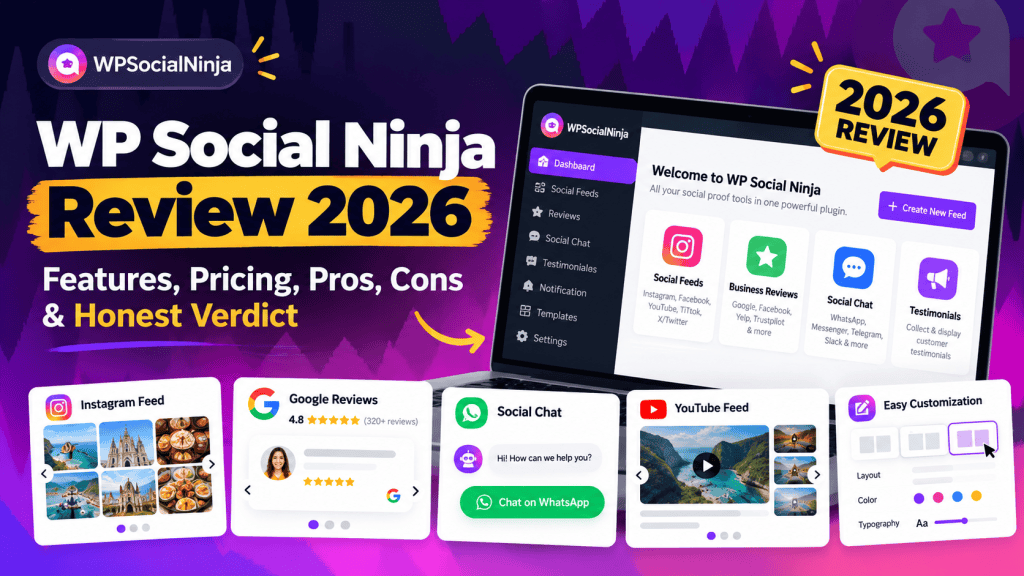
WP Social Ninja combines three useful website functions: social feeds, customer reviews and social chat.
Its social-feed functionality currently supports Instagram, Facebook, X, YouTube and TikTok.
The broader plugin also connects to review and communication platforms, making it useful for WordPress businesses that want more than a basic social gallery.
Best Use Cases
WP Social Ninja fits:
- Small business websites
- Local businesses
- WooCommerce stores
- Agencies managing multiple WordPress sites
- Review-heavy service businesses
Pros
- Social feeds and reviews in one plugin
- TikTok and Instagram support
- Social chat integrations
- Annual and lifetime licensing
- Multi-site agency options
Cons
- Primarily relevant to WordPress
- Businesses needing only one simple feed may not use its broader feature set
- Pricing promotions can vary
Pricing
The currently listed standard annual pricing is approximately $71/year for one site, $199/year for 25 sites and $319/year for unlimited sites.
How to Choose a Social Media Widget: 6-Point Framework
Before installing a widget, evaluate these six areas.
1. Define the Conversion Goal
Decide what the feed should accomplish.
Possible goals include:
- Increase Instagram followers
- Build customer trust
- Display event activity
- Generate product clicks
- Showcase testimonials
- Increase video engagement
A widget without a clear goal often becomes decorative rather than useful.
2. Identify Required Networks
If you only need to embed Instagram feed content, a specialized Instagram plugin may be enough.
If you need Instagram, LinkedIn, TikTok, YouTube and reviews in one place, a broader aggregator such as Juicer, EmbedSocial or Taggbox may make more sense.
3. Check Traffic Limits
Do not compare pricing without checking monthly widget-view limits.
A $19 plan with 10,000 views can become more expensive than an annual WordPress plugin once website traffic grows.
4. Evaluate Moderation
UGC should not automatically appear without controls.
Look for:
- Manual approval
- Keyword filtering
- Post exclusion
- Hashtag filtering
- Content moderation
5. Review Customization
Your widget should look like part of your website rather than an external advertisement.
Check fonts, spacing, layouts, mobile responsiveness, branding removal and custom CSS options.
6. Measure Performance Impact
A visually impressive social feed is not valuable if it damages page speed.
Test the widget before deploying it across the entire website.
Social Media Widget Installation Tips
For WordPress plugins, install the plugin, connect the required social account, create the feed, customize the layout and insert the provided block or shortcode.
For hosted social aggregators, the process usually involves creating the feed in the vendor dashboard and adding a JavaScript or iframe embed to your page.
Place widgets where they support intent.
For example:
- Instagram UGC → product pages
- Customer reviews → service pages
- TikTok videos → campaign landing pages
- Event feed → event homepage
- Social wall → community or brand page
Avoid inserting a feed simply because empty page space exists.
Performance and Core Web Vitals Best Practices
Social feeds can add scripts, images, videos and third-party requests.
That means poor implementation can affect Largest Contentful Paint, Interaction to Next Paint and Cumulative Layout Shift.
Use these practices:
- Lazy-load widgets below the fold.
- Avoid loading multiple social widgets on every page.
- Reserve fixed dimensions to reduce layout movement.
- Defer non-critical third-party JavaScript.
- Use cached feeds where supported.
- Limit the number of initially displayed posts.
- Avoid auto-playing several videos simultaneously.
- Test mobile performance separately.
Social widgets should also not be treated as a substitute for indexable website content. Content rendered through third-party scripts or iframes may not provide the same search value as properly written HTML content on the page.
Pro Tips for Social Media Widgets in 2026
Add Contextual CTAs
Do not end the visitor journey at the feed.
Add relevant actions such as:
View Collection, See Customer Stories, Explore Event Highlights, or Follow Us on Instagram.
Use Real UGC Near Conversion Points
A customer photo beside a product or service offer can provide stronger context than placing every social post on a generic homepage feed.
Combine Reviews With Social Content
Posts demonstrate activity.
Reviews demonstrate trust.
Combining both gives visitors stronger validation before they convert.
Track Widget Interactions
Measure:
- Social profile clicks
- Product clicks
- CTA clicks
- Video engagement
- Lead generation
- Assisted conversions
Use your analytics platform and event tracking rather than assuming the widget is contributing to conversions.
Prioritize Quality Over Feed Size
Twenty strong posts are usually more useful than hundreds of unfiltered posts.
Curate the content that supports the page’s purpose.
FAQ
What is the best social media widget for WordPress in 2026?
Smash Balloon and WP Social Ninja are strong WordPress-focused choices. Smash Balloon is particularly suitable for dedicated Instagram, Facebook, YouTube and TikTok feeds, while WP Social Ninja combines social feeds, reviews and chat functionality.
How can I embed an Instagram feed on my website?
You can connect an Instagram account through a social feed plugin or hosted social aggregator, customize the feed and add the generated shortcode, block, JavaScript or iframe to your website.
What is the best TikTok widget for a website?
For WordPress, Smash Balloon and WP Social Ninja provide dedicated TikTok feed functionality. For multi-platform websites, EmbedSocial, Taggbox and Juicer are alternatives worth comparing.
Do social media widgets improve SEO?
Not automatically. Their main SEO value is indirect: stronger engagement, social proof, improved content discovery and potentially better user experience. Important search-targeted content should still exist as crawlable HTML rather than relying entirely on third-party feeds.
What are social media aggregator tools?
Social media aggregator tools collect content from multiple networks and display it through a single website feed or social wall. They are commonly used for UGC campaigns, events, ecommerce social proof and branded content hubs.






Leave a Reply