A hashtag aggregator collects social media posts using specific hashtags and displays them in one place. It is useful for businesses, event organizers, ecommerce stores, and webmasters to showcase user-generated content and highlight campaigns on websites. Features may include content moderation, customizable layouts, WordPress integration, and aggregator API access. The best solution depends on your needed social networks, desired control over the content, and embedding plans.
What Is a Hashtag Aggregator?
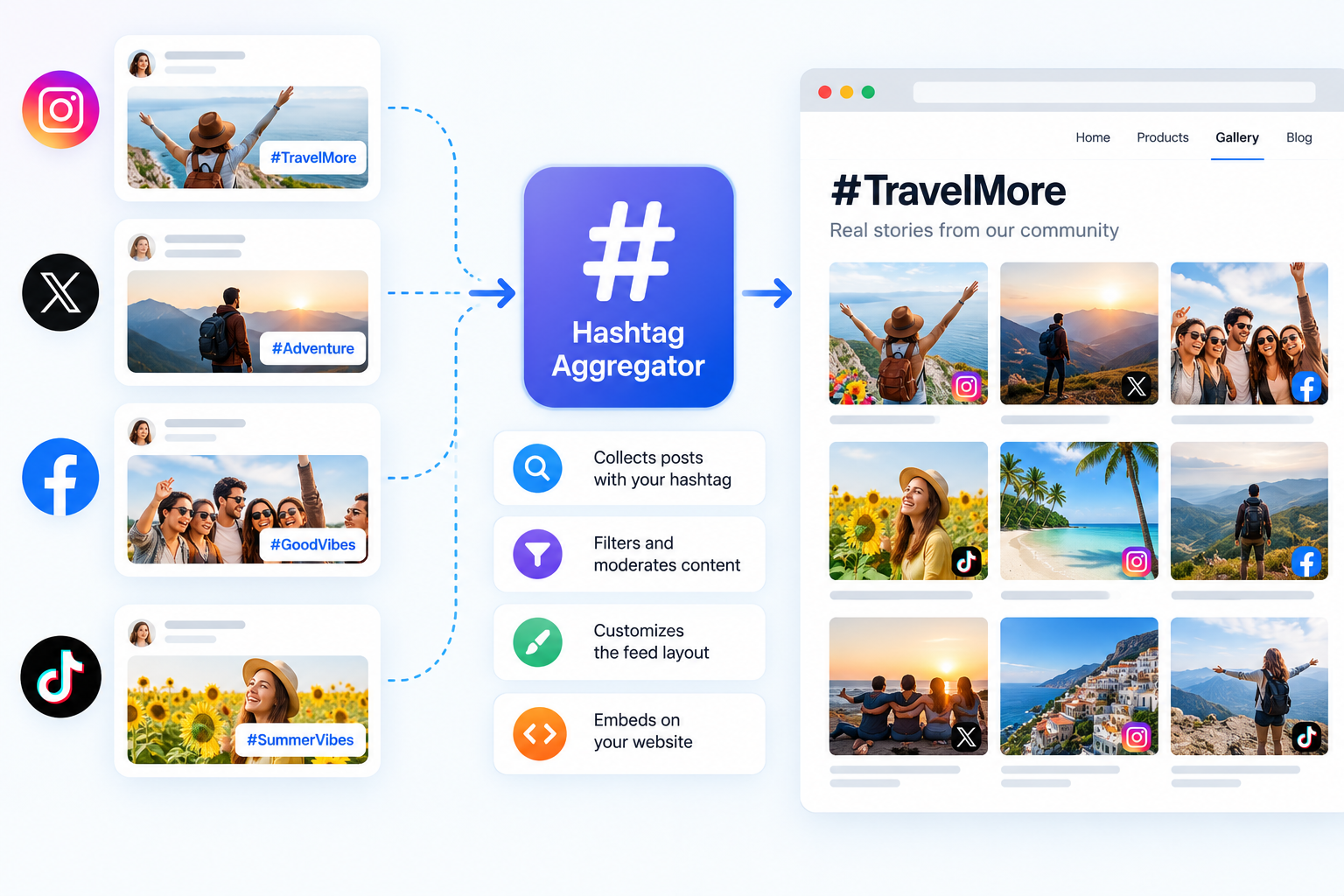
A hashtag aggregator is a tool that collects social media content associated with specific hashtags and organizes eligible posts into a single feed. Instead of asking visitors to browse multiple social platforms, you can display relevant content together on a website or another supported digital channel.
For example, a business running a product launch campaign might collect posts published with its campaign hashtag. An event organizer could use a hashtag aggregator to bring attendee posts together, while an ecommerce business might showcase customer-created photos and videos.
A hashtag aggregator can do more than collect posts. Depending on the solution, it may also help you filter content, moderate submissions, customize the feed, embed it on a website or display live hashtag feed on screens in events and venues.
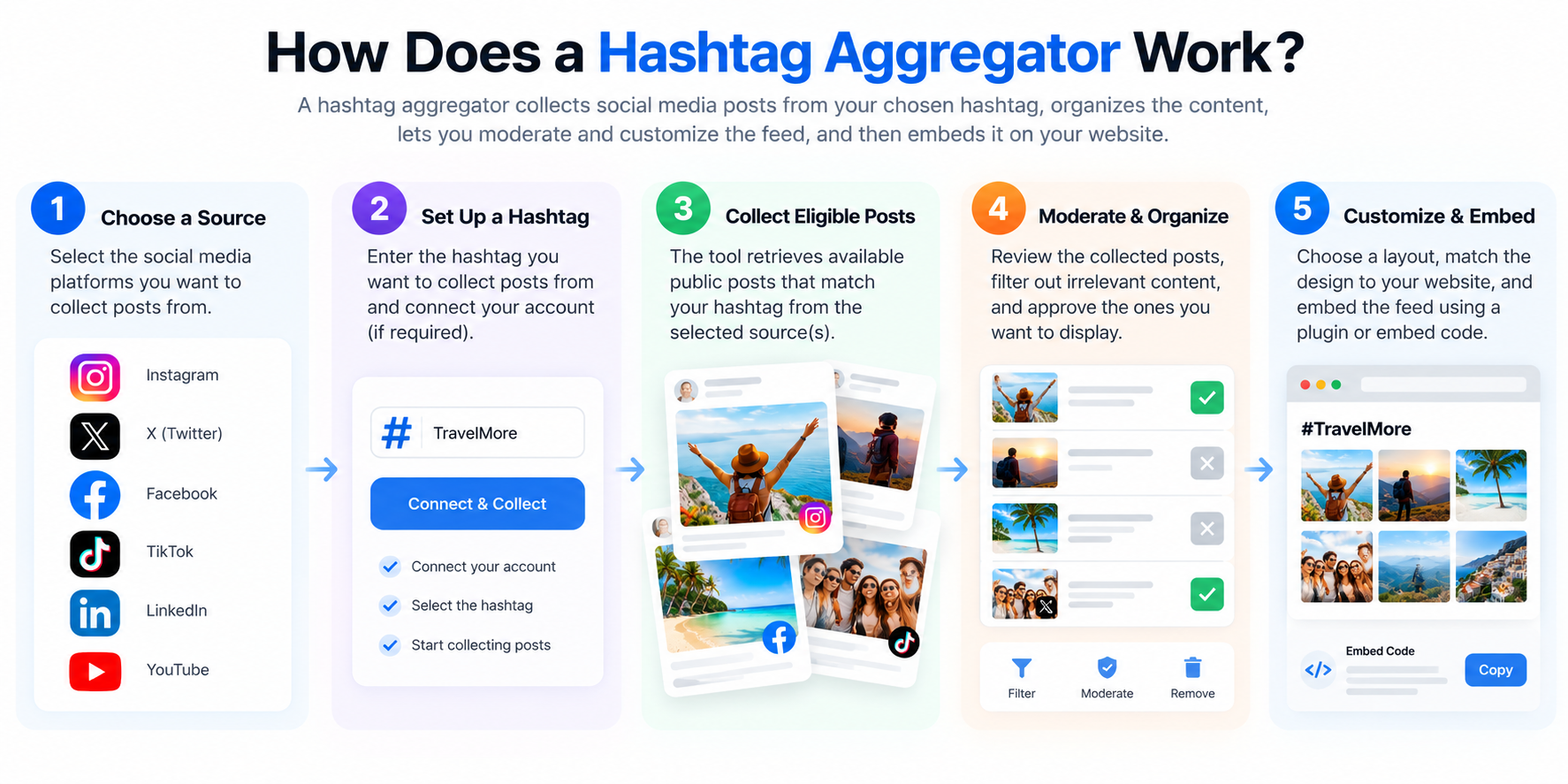
How Does a Hashtag Aggregator Work?
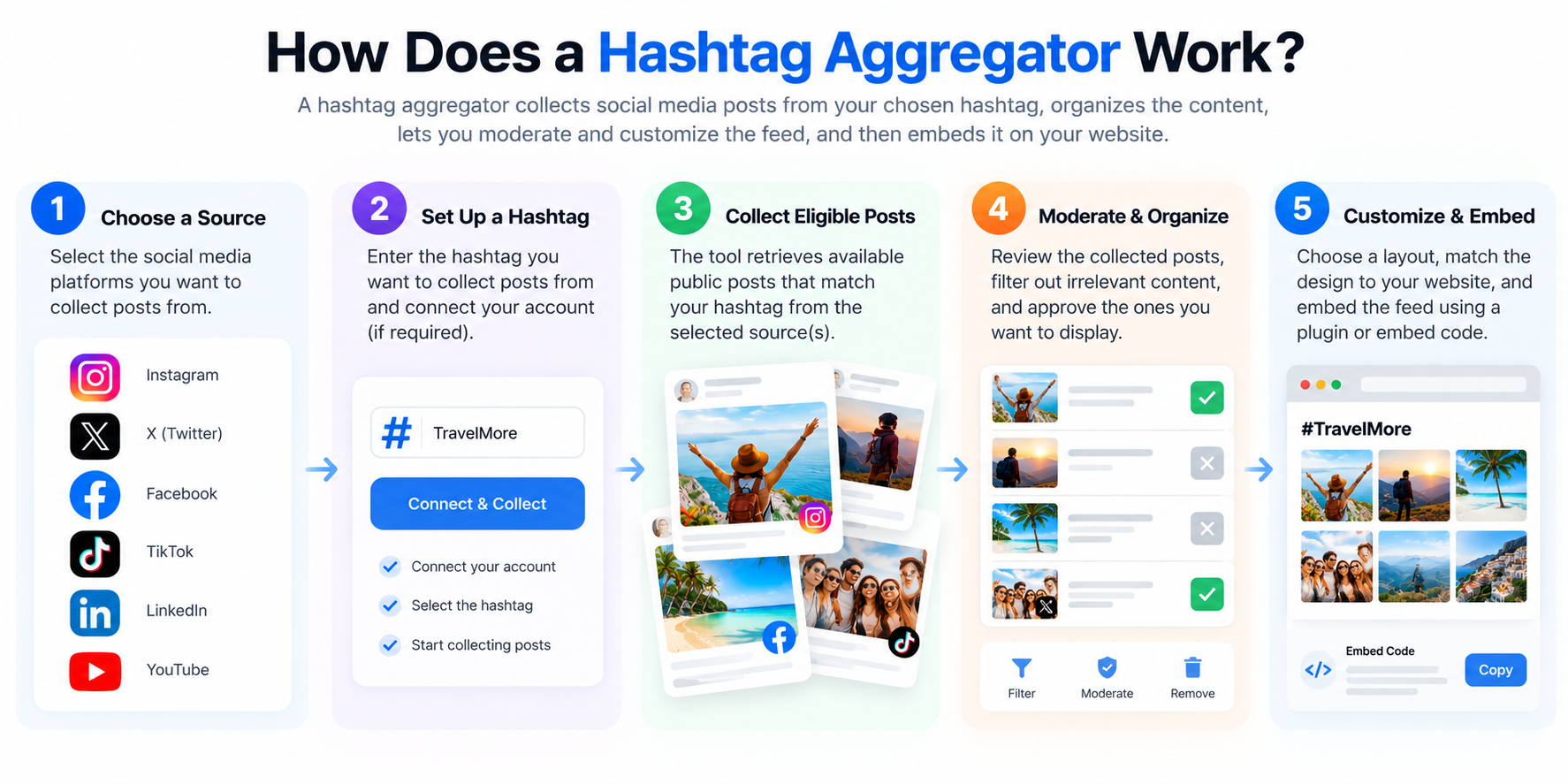
Most hashtag aggregation workflows involve five steps:
- Choose a source: Select a supported social media platform and the permitted content source.
- Set up a hashtag: Enter the hashtag you want to collect content from, where the integration supports hashtag-based retrieval.
- Collect eligible posts: The service retrieves content available through its supported connection or API.
- Review and organize content: Use available filters and moderation tools to manage which posts appear.
- Publish the feed: Customize the display and embed it on your website or another supported destination.
The exact process varies by provider and social network. Some integrations require a connected professional account, specific permissions, or a paid API plan. Others may support different source types rather than unrestricted public hashtag searches.
Hashtag Aggregator vs. Hashtag Feed vs. Hashtag Widget
These terms are related, but they describe different parts of the process.
| Term | Meaning | Example |
|---|---|---|
| Hashtag aggregator | The tool that collects and organizes eligible posts | A service collecting posts associated with an event hashtag |
| Hashtag feed | The resulting collection of posts | A feed containing approved photos and videos from an event |
| WordPress Hashtag aggregator widget | The component that displays the feed on a WP website | A grid of social posts embedded on an event website running on WordPress |
| Hashtag aggregator API | A technical interface for accessing supported data or functionality | A developer integrating eligible social content into a custom application |
Understanding the difference makes it easier to choose the right solution. If you want to display posts on a website without building a custom application, an embeddable hashtag aggregator widget may be sufficient. If you need deeper integration with an existing platform, an API may be more appropriate.
Who Needs a Hashtag Aggregator?
A social media aggregator like a hashtag aggregator can serve several purposes:
- Businesses: Bring campaign-related social content onto relevant website pages.
- Event organizers: Collect attendee posts associated with an event hashtag.
- Ecommerce stores: Showcase relevant customer-created content, subject to the necessary permissions.
- Marketing teams: Organize content from social campaigns.
- Publishers and communities: Display relevant conversations and user-generated media.
- Developers: Integrate supported social content into custom applications using social media aggregator API.
The best use case is one where collecting posts from a shared hashtag makes the content more useful or easier to explore.
Why Use a Social Media Hashtag Aggregator for Your Website?
Social media content often lives across multiple platforms. A social media hashtag aggregator for a website can bring relevant posts into a single location, making campaign content easier to discover and manage.
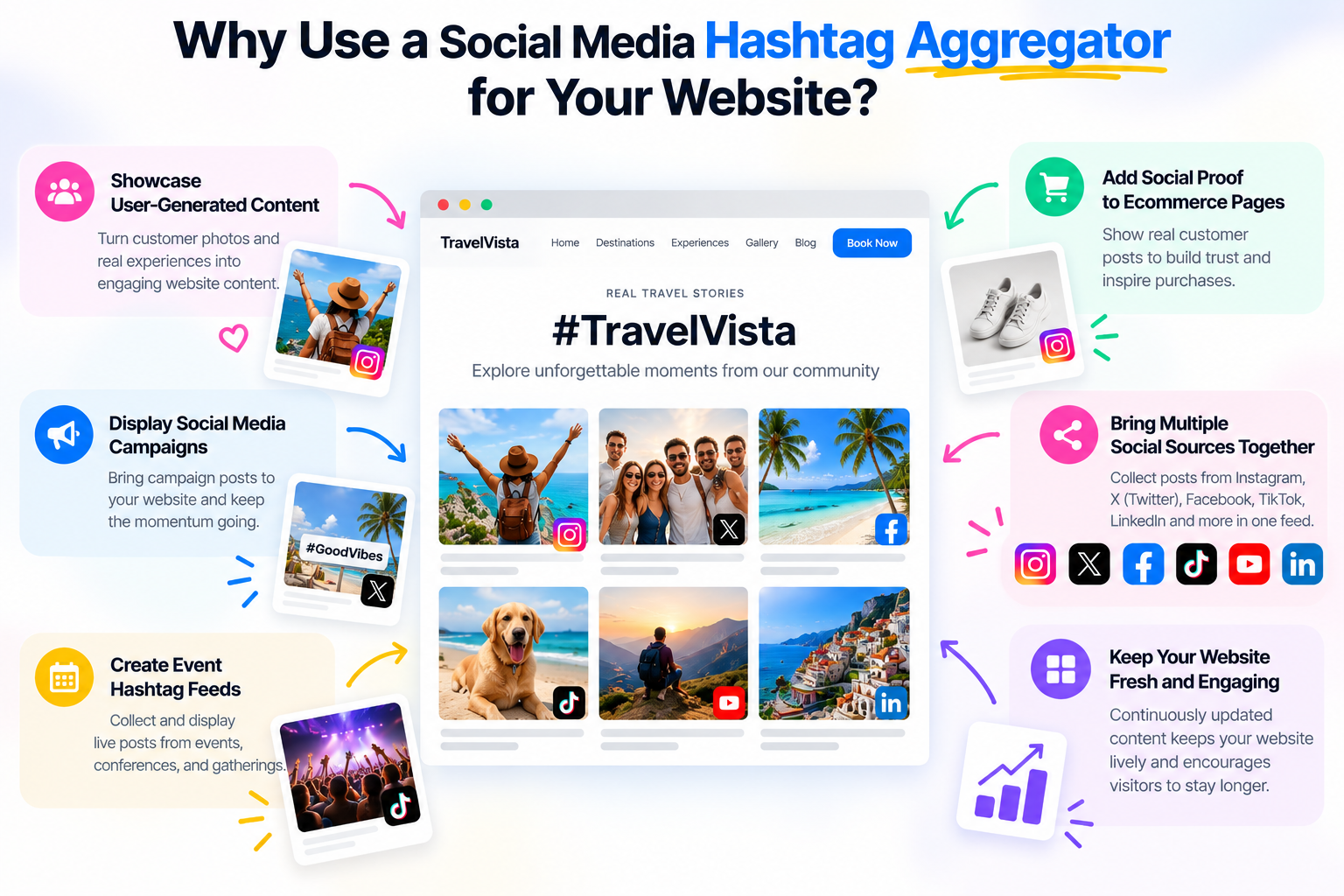
Showcase User-Generated Content
Customers and community members may publish photos, videos, and posts related to a product, experience, or event. A UGC hashtag aggregator can help organize eligible content around a shared topic on any social media platform through hashtags.
For example, a travel business might collect posts from a campaign encouraging customers to share their experiences with a particular hashtag. The resulting feed could appear on a relevant campaign page, provided the content is available and its use is authorized.
User-generated content can make a page more informative by showing real examples. However, businesses should obtain any required permissions and avoid presenting third-party posts as endorsements when that would be misleading.
Display Social Media Campaigns on Your Website
A hashtag campaign can generate content across several social media accounts. Embedding a hashtag feed on a campaign landing page gives visitors another way to explore the campaign.
This can be useful for product launches, seasonal promotions, community initiatives, and brand campaigns.
The value comes from presenting relevant content in a useful context, not simply from adding more posts to a page.
Create Event Hashtag Feeds
Events often encourage attendees to share photos and updates using a common hashtag.
An event hashtag wall/aggregator can organize eligible posts into a feed for an event website, registration page, or supported display screen.
Before the event, organizers can prepare the feed and test its layout. During the event, moderators can review content and remove inappropriate or irrelevant posts where the tool supports these controls.
Add Social Content to Ecommerce Pages
An ecommerce website may use relevant user-generated content to provide additional context about how products are used.
For example, a fashion retailer might display authorized customer photos on a campaign page. A homeware business could curate images showing products in different settings.
The content should relate directly to the products or campaign, and the website should clearly distinguish customer-created posts from official product claims.
Bring Multiple Social Sources Together
A social media aggregator tool like Taggbox can combine eligible content from supported social networks into one display.
This can reduce the need for visitors to navigate between platforms to explore a campaign. It can also give website owners a more consistent way to present content.
However, supported sources and available post information vary. Always check which platforms, account types, content formats, and retrieval methods are actually supported.
Key Features to Look for in a Hashtag Aggregator Widget
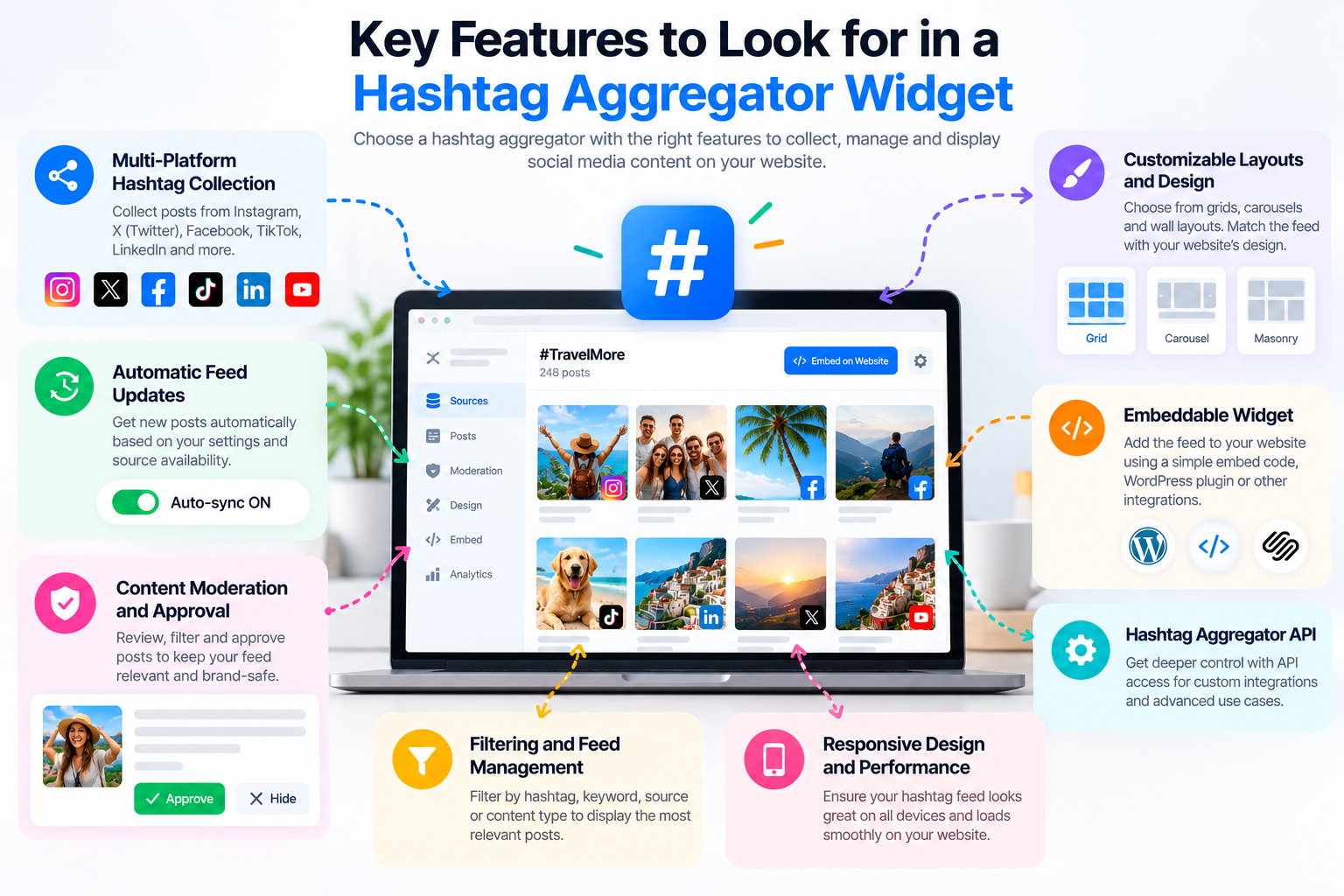
Not every hashtag aggregator provides the same capabilities. Before choosing a tool, consider how you plan to collect, manage, and display social media content.
Multi-Platform Hashtag Collection
If your audience uses several social networks, check whether the aggregator supports each source you need.
Look beyond a list of platform logos. Confirm whether the tool can retrieve the specific content you want, such as hashtag-based posts, connected-account content, or posts from selected pages.
Also check whether different sources have different setup requirements, permissions, or usage limits.
Automatic Hashtag Feed Updates
Some tools refresh feeds automatically, allowing newly available content to appear without manually rebuilding the widget.
However, update frequency can depend on the provider, the source platform, API restrictions, and the selected plan.
Before choosing a solution, ask:
- How often is the feed refreshed?
- Can updates be delayed by source-platform restrictions?
- What happens if authentication expires?
- Are there limits on the number of posts or feeds?
- Does the provider explain errors and connection problems?
Avoid assuming that every hashtag aggregator provides instantaneous updates.
Content Moderation and Approval
Moderation is particularly important when displaying content created by the public.
Depending on the solution, moderation tools may let you review posts before publication, remove irrelevant content, filter selected terms, or apply automated rules.
A practical workflow is to establish moderation criteria before launching the campaign. Decide which content is relevant, what requires approval, and which posts should never be displayed.
Moderation controls differ across providers, so verify the available functionality rather than assuming every widget includes the same features.
Customizable Layouts and Design
A hashtag aggregator feed should fit naturally into the page where it appears.
Common layout options may include grids, cards, carousels, or wall-style displays. Some tools also offer controls for colors, typography, spacing, and the number of posts displayed.
Choose a design based on the purpose of the page. An event gallery might benefit from a visual grid, while a compact campaign section may work better with a smaller set of cards.
Use an actual preview to assess readability, spacing, and the way images or videos appear.
Embeddable Hashtag Aggregator
An embeddable hashtag aggregator lets you display the hashtag feed on a supported website without building the entire system yourself.
Depending on the provider, installation may use:
- A JavaScript embed snippet.
- An iframe.
- A native WordPress plugin.
- A platform app or integration.
- Another documented installation method.
Check which option is supported by your website platform and whether the embed works with your existing theme, content editor, or page builder.
Hashtag Aggregator API
A hashtag aggregator API can be useful when a standard widget does not provide enough control.
Developers may use supported APIs to integrate eligible social content into a custom website, campaign application, or internal workflow.
Before selecting an API-based solution, review its documentation, authentication requirements, available endpoints, rate limits, pricing, and data-use restrictions.
An API is not automatically a way to bypass social platform limitations. The information you can retrieve depends on the provider’s implementation and the source platform’s permissions.
Filtering and Feed Management
A hashtag may be used by different communities for unrelated purposes. As a result, a feed can include content that does not fit your campaign.
Filtering and moderation tools can help manage relevance. Depending on the service, you may be able to select source types, filter certain terms, or manually approve posts.
Test these controls before launching a public campaign, especially when the feed will appear on a business website or event display.
Responsive Design and Website Performance
The widget should remain usable on desktop and mobile screens.
Check whether text is readable, images fit the layout, navigation controls work, and the feed avoids unexpected horizontal scrolling.
Third-party embeds can also introduce additional scripts, network requests, and media loading. Test the published page and monitor its performance rather than assuming an embedded widget has no effect on loading speed.
How to Add a Hashtag Aggregator Widget to Your Website
The following workflow explains how to set up an embeddable hashtag feed. The exact interface and steps depend on the provider and source platform.
Step 1: Create a Hashtag Feed
Choose a hashtag aggregator that supports your intended source and website integration.
Create a feed in the provider’s dashboard and select the relevant content source. Before proceeding, confirm that the source and intended display are supported by the applicable permissions.
Step 2: Select a Social Network and Hashtag
Choose the social network you want to use and enter the hashtag, where the integration supports hashtag-based collection.
Some platforms may require a connected account, specific account eligibility, or additional permissions. Follow the provider’s current instructions and verify that the selected source can retrieve the expected content.
Step 3: Filter and Moderate the Posts
Review the collected posts before displaying them publicly.
Remove irrelevant content and apply available moderation settings. If the feed is intended for a business campaign or event, establish clear approval rules and assign responsibility for reviewing posts.
Step 4: Customize the Hashtag Feed
Select a layout that fits the website and adjust the available design settings.
Preview how the feed appears with real content. Check image crops, text readability, spacing, and mobile behavior.
Step 5: Generate the Embed Code or Select an Integration
If the provider offers an embed snippet, generate it through the dashboard and follow the documented instructions.
If a native plugin or platform app is available, follow that integration’s setup process instead.
Keep the code intact unless the provider documents a supported customization method.
Step 6: Add the Feed to Your Website
Insert the feed using the supported method for your website platform.
This may involve an HTML block, a plugin, an app, or another designated integration area. The appropriate location depends on whether the feed belongs on a landing page, a blog post, an event page, or another template.
Step 7: Test and Publish
Before publishing widely, check that:
- The intended hashtag source is connected.
- The displayed posts are relevant and appropriately moderated.
- The feed loads correctly on desktop and mobile.
- Source links and available controls work.
- The widget does not introduce layout problems.
- The update process behaves as documented.
If posts are missing or the feed stops refreshing, check the connection status, account permissions, source restrictions, and provider documentation.
How to Use a WordPress Hashtag Aggregator
WordPress users can choose between a native plugin and a hosted widget that is embedded in a page. The right option depends on the available integrations and how much control is needed.
WordPress Hashtag Aggregator: Plugin vs. Embed Code
A WordPress plugin is installed within WordPress and provides functionality through the site’s administration interface. A hosted widget is generally configured through an external service and displayed on the website using its supported embedding method.
| Consideration | WordPress plugin | Hosted embeddable widget |
|---|---|---|
| Setup | Installed and configured in WordPress | Configured through the provider, then embedded |
| Management | Often handled through the WordPress dashboard | Often managed through an external dashboard |
| Customization | Depends on plugin functionality | Depends on the widget provider |
| Maintenance | Plugin compatibility and updates matter | Provider availability and embed compatibility matter |
| Source access | Depends on the plugin and integration | Depends on the provider and its source connections |
Neither approach is automatically better. Compare the actual features, permissions, maintenance requirements, and cost.
How to Install a WordPress Plugin Hashtag Aggregator
A typical setup process is:
- Confirm that the plugin is maintained and compatible with your WordPress installation.
- Install the plugin using the documented method.
- Connect the supported social source.
- Configure the hashtag feed and moderation settings.
- Add the feed to the relevant page, post, or template.
- Preview the result and test the published page.
The exact steps will vary by plugin. Do not assume that every WordPress hashtag aggregator supports the same platforms or collection methods.
How to Embed a Hashtag Aggregator in WordPress Without a Plugin
If the selected provider supports embedding, you may be able to display the feed without installing a dedicated WordPress plugin.
Generate the embed code through the provider’s dashboard and add it using an appropriate HTML block or other documented method.
After publishing, check that the widget loads correctly, remains responsive, and does not conflict with the active theme or other scripts.
Common WordPress Hashtag Aggregator Problems
Common issues include:
- The feed is empty: Check the hashtag, source connection, and availability of eligible posts.
- Posts stop updating: Check authentication, usage limits, and source-platform restrictions.
- The layout looks broken: Review theme compatibility, container width, and widget settings.
- The embed does not appear: Confirm that the code was added correctly and that the provider’s scripts are not blocked.
- The page loads slowly: Test the widget’s scripts and media loading, and investigate other page-performance issues.
Use the plugin or provider’s documentation to resolve source-specific problems.
What is an Instagram Hashtag Aggregator and How It Works?
An Instagram hashtag aggregator collects eligible Instagram content associated with a hashtag and organizes it into a feed.
This can be useful for campaign pages, event galleries, customer-created content, and other visual marketing experiences.
Before choosing an Instagram hashtag aggregator, verify its current Meta integration, account requirements, permissions, and available content types.
What to Check Before Connecting Instagram
Check whether the solution requires an eligible professional account, a connected account, or specific permissions.
Confirm whether the integration retrieves public hashtag content, connected-account content, or another supported source. These are not necessarily interchangeable.
Also review the available content fields, refresh frequency, and any limitations on the number of hashtags or posts.
How to Display an Instagram Hashtag Feed on a Website
The general workflow is to connect the eligible source, configure the hashtag feed, moderate the available posts, customize the display, and publish it using a supported integration.
If your website uses WordPress, check whether a native plugin provides the required functionality or whether a hosted widget is more suitable.
Do not assume that embedding an individual Instagram post is the same as aggregating multiple posts through a hashtag.
You can find a full guide to display an Instagram hashtag feed on your website by following this link!
Twitter/X Hashtag Feed Aggregator
A Twitter/X hashtag feed aggregator collects eligible posts associated with a selected hashtag and presents them in a feed or other supported display.
This can be useful for event conversations, brand campaigns, public discussions, and community activity.
Features to Evaluate
Before selecting an X hashtag feed aggregator, verify:
- Which post types and content fields are available.
- How hashtag queries are configured.
- Whether the service supports moderation and filtering.
- How frequently the feed is refreshed.
- What API access, usage limits, or charges apply.
- Whether the feed can be embedded on your intended website.
X API access and available functionality can change. Check current documentation rather than assuming that every tool can retrieve all public posts or provide unrestricted real-time access.
Facebook Hashtag Aggregator
A Facebook hashtag aggregator may help display eligible Facebook content in a website feed, but its capabilities depend on the supported integration and the permissions available.
Before selecting a solution, distinguish between public hashtag discovery, content from connected Pages, and other source types. A tool that supports Facebook Page feeds does not necessarily support unrestricted hashtag-based discovery across Facebook.
Check which sources are supported, what account permissions are required, and whether the selected content can be displayed on the intended page.
If the provider does not document the required hashtag collection method, ask for clarification before relying on that functionality.
Combine Multiple Social Networks in One Hashtag Aggregator Feed
A multi-platform hashtag aggregator can bring eligible content from different social networks into one display.
For example, an event organizer may want to present content from several supported sources on an event website. A campaign team may want to collect posts from different networks and organize them under a common theme.
Before combining sources, verify that each platform supports the intended collection method. Also consider differences in available content fields, post formats, attribution, update behavior, and moderation controls.
A unified feed should make content easier to explore without hiding where individual posts originated.
Hashtag Aggregator API: When Do You Need One?
A hashtag aggregator API is relevant when developers need more control than a standard widget provides.
What Is a Hashtag Aggregator API?
An API is an interface that allows an application to access supported data or functionality through defined requests.
Depending on the service, a hashtag aggregator API may enable developers to retrieve eligible feed data, integrate posts into a custom interface, or connect social content to an existing application.
The API’s capabilities depend on the provider and the source platforms.
Hashtag Aggregator API vs. an Embeddable Widget
Choose a widget when you need a relatively straightforward way to display a feed on a supported website.
Consider an API when you need a custom interface, a more specialized workflow, or integration with an existing application.
An API generally requires more technical work. Developers may need to manage authentication, errors, rate limits, data handling, and source-specific requirements.
What to Check Before Integrating an API
Review the provider’s documentation for:
- Authentication and permissions.
- Supported endpoints and available content fields.
- Rate limits and usage costs.
- Data retention and deletion requirements.
- Error handling and connection monitoring.
- Rules governing the display and reuse of retrieved content.
Do not assume that an API can access content that the source platform does not make available to the integration.
Free Hashtag Aggregator Widget: What Should You Expect?
A free hashtag aggregator widget can be useful for testing a feed or running a small campaign. However, free plans may have limitations that affect whether the tool is suitable for a production website.
Free vs. Paid Hashtag Aggregator Tools
| Feature | What to verify in a free plan | What to check in a paid plan |
|---|---|---|
| Social sources | Which networks and source types are available | Whether additional integrations are included |
| Feed volume | Limits on posts, feeds, or views | Higher limits and scaling options |
| Refresh behavior | Update frequency and restrictions | Whether refresh behavior differs |
| Customization | Available layouts and design controls | Additional styling or branding options |
| Moderation | Which filters and approval controls are included | Additional moderation features |
| Branding | Whether provider branding is required | Whether branding can be removed |
| Support | Documentation and available assistance | Support levels and response expectations |
Do not choose a free tool based only on the absence of an upfront payment. Consider the source permissions, usage limits, branding, maintenance, and future costs.
How to Choose a Free Hashtag Aggregator Widget
Start with the requirements that matter most:
- Does it support the social platform and source you need?
- Can you use it on your website platform?
- Does it provide the moderation and customization controls required?
- Are the usage limits sufficient for your campaign?
- Does it clearly explain data access and content-use requirements?
A free plan is a good starting point only if it meets your practical needs and applicable requirements.
How to Choose the Best Hashtag Aggregator Site
The best hashtag aggregator site is not necessarily the one with the longest feature list. It is the one that supports your sources, works with your website, and provides the controls you actually need.
Supported Social Platforms and Sources
Verify each required network and source type individually. A provider may support some content types on one platform but not another.
Ease of Installation
Compare native plugins, hosted widgets, platform apps, and API integrations. Choose a method that fits your technical resources and ongoing maintenance capacity.
Moderation and Content Permissions
Check how the tool handles approval, filtering, and content attribution. Understand what permission is needed to republish images, videos, or other user-created material.
Customization and Performance
Review available layouts, mobile behavior, accessibility, and loading performance. Test the feed in the context of the actual page where it will appear.
Pricing and Support
Compare plan limits, source availability, refresh behavior, and support options. Confirm the total cost for your expected usage rather than relying only on a starting price.
Hashtag Aggregator Use Cases
Ecommerce and Product Pages
A curated feed of authorized customer content may complement product descriptions and provide examples of how products are used.
Events, Conferences, and Exhibitions
An event hashtag feed can help visitors explore eligible attendee posts on an event website or a supported display screen.
Brand and Hashtag Campaigns
A campaign feed can bring relevant posts together, helping visitors explore how a campaign is being used by its community.
Community and Educational Websites
A hashtag aggregator can organize relevant content around a shared topic, activity, or event.
Digital Displays and Social Walls
A hashtag widget typically presents a feed on a website, while a social wall may be designed for a larger display such as an event screen. Some solutions support both, but the display requirements and moderation needs can differ.
For public screens, test the feed in advance and establish a moderation process before displaying user-generated content.
FAQs
What Is a Hashtag Aggregator?
A hashtag aggregator is a tool that collects eligible social media content associated with selected hashtags and organizes it into a feed. Depending on the service, the feed can be moderated, customized, and displayed on a website.
How Does a Hashtag Aggregator Work?
It connects to a supported social source, retrieves eligible posts, organizes the available content, and provides a way to display the feed. The process and available features depend on the provider and platform permissions.
Can I Embed a Hashtag Feed on My Website?
Yes, when the selected solution supports website embedding. Available methods may include embed code, a WordPress plugin, or a platform-specific integration.
Is There a Free Hashtag Aggregator Widget?
Some providers offer free plans or trial options. Check their current source support, feed limits, branding, refresh behavior, and feature restrictions before choosing one.
Can I Use a WordPress Hashtag Aggregator Without Coding?
Depending on the tool, you may be able to use a native plugin or a hosted widget with a documented embed method. Some integrations still require account connections or technical configuration.
Can I Display Instagram Posts by Hashtag on My Website?
This depends on the current Instagram integration, account eligibility, permissions, and source limitations. Verify that the chosen solution supports the specific hashtag collection method you need.
Can a Hashtag Aggregator Combine Multiple Social Networks?
Some solutions support multiple networks in one feed. Confirm that the tool supports each required platform and source type, as capabilities and permissions can differ.
Can I Build a Hashtag Feed Using an API?
Yes, if the selected provider offers an API that supports your intended source and use case. You’ll need to follow its authentication, rate-limit, and data-use requirements.
Can I Aggregate Facebook Hashtags?
That depends on the integration. Support for Facebook Page content does not automatically mean the tool can search all public Facebook posts by hashtag. Verify the exact capability before choosing a solution.
Does a Hashtag Aggregator Update Automatically?
Some feeds refresh automatically, but the frequency depends on the provider, source connection, plan, and platform restrictions.
Can I Moderate Posts Before They Appear on My Website?
Some tools provide manual approval, filtering, or automated moderation. Check which controls are available and test them before publishing a public feed.
Does a Hashtag Widget Slow Down a Website?
It can affect performance because embedded widgets may load scripts, images, and other external resources. Test the published page, optimize media where possible, and monitor loading performance.
Expert Tip: Tools like Taggbox, embedsocial, sociableKIT are comparatively faster than other tools
Start Using a Hashtag Aggregator for Your Website
A hashtag aggregator can help you collect relevant social media content, organize campaign posts, and display eligible user-generated content in one place.
The right solution depends on your social sources, moderation requirements, website platform, and preferred integration method. Before choosing a tool, verify platform compatibility, API access, content-use permissions, and performance.
Ready to bring your hashtag content together? Explore hashtag aggregator options, preview the available feed layouts, and choose an integration that fits your website and supported social platforms.




Leave a Reply