Social media aggregator tools collect content from multiple social networks, hashtags, mentions, or accounts and bring it into one place where you can curate, moderate, customize, and display it. Businesses use them to embed social feeds on websites, create event social walls, showcase user-generated content, power digital signage, and build social-commerce experiences.
But choosing a social media aggregator isn’t simply about finding the tool that connects to the most networks. You also need to consider moderation, customization, refresh frequency, integrations, analytics, pricing, API access, and how you plan to use the aggregated content.
In this guide, we’ll compare popular social media aggregator tools based on their features, supported sources, use cases, integrations, pricing considerations, and limitations.
Social Media Aggregator Tools at a Glance
| Tool | Particularly useful for | Key capabilities |
|---|---|---|
| Taggbox | UGC, social feeds, events and social commerce | Social aggregation, moderation, customization, UGC, analytics and shoppable experiences |
| Walls.io | Events, live displays and social walls | Multi-source aggregation, real-time feeds, moderation, displays and API |
| Curator | Website social feeds | Multi-network aggregation, moderation, templates and embeds |
| Juicer | Multi-platform social feeds | Social aggregation, moderation, custom CSS and website embeds |
| EmbedSocial | Social proof and UGC | Social feeds, reviews, UGC, widgets and templates |
| Flockler | Websites, digital signage and organizations | Social aggregation, layouts, moderation, displays and APIs |
| SociableKIT | Simple website embeds | Social feed widgets and ready-to-use website integrations |
Features, plans and pricing can change, so verify current details on the provider’s website before purchasing. A June 2026 comparison from Taggbox, for example, lists differences among several major platforms in sources, analytics, compliance, integrations and API availability.
What Is a Social Media Aggregator Tool?
A social media aggregator tool collects social content from different sources and combines it into a centralized feed.
Depending on the platform, you may be able to collect content from:
- Social media accounts
- Hashtags
- Mentions
- Pages and profiles
- Videos
- User-generated content
- Reviews
- RSS feeds
- Other content sources
The aggregated content can then be moderated, filtered, styled and published on websites, landing pages, digital displays, event screens, ecommerce stores or other digital experiences.
How Does a Social Media Aggregator Work?
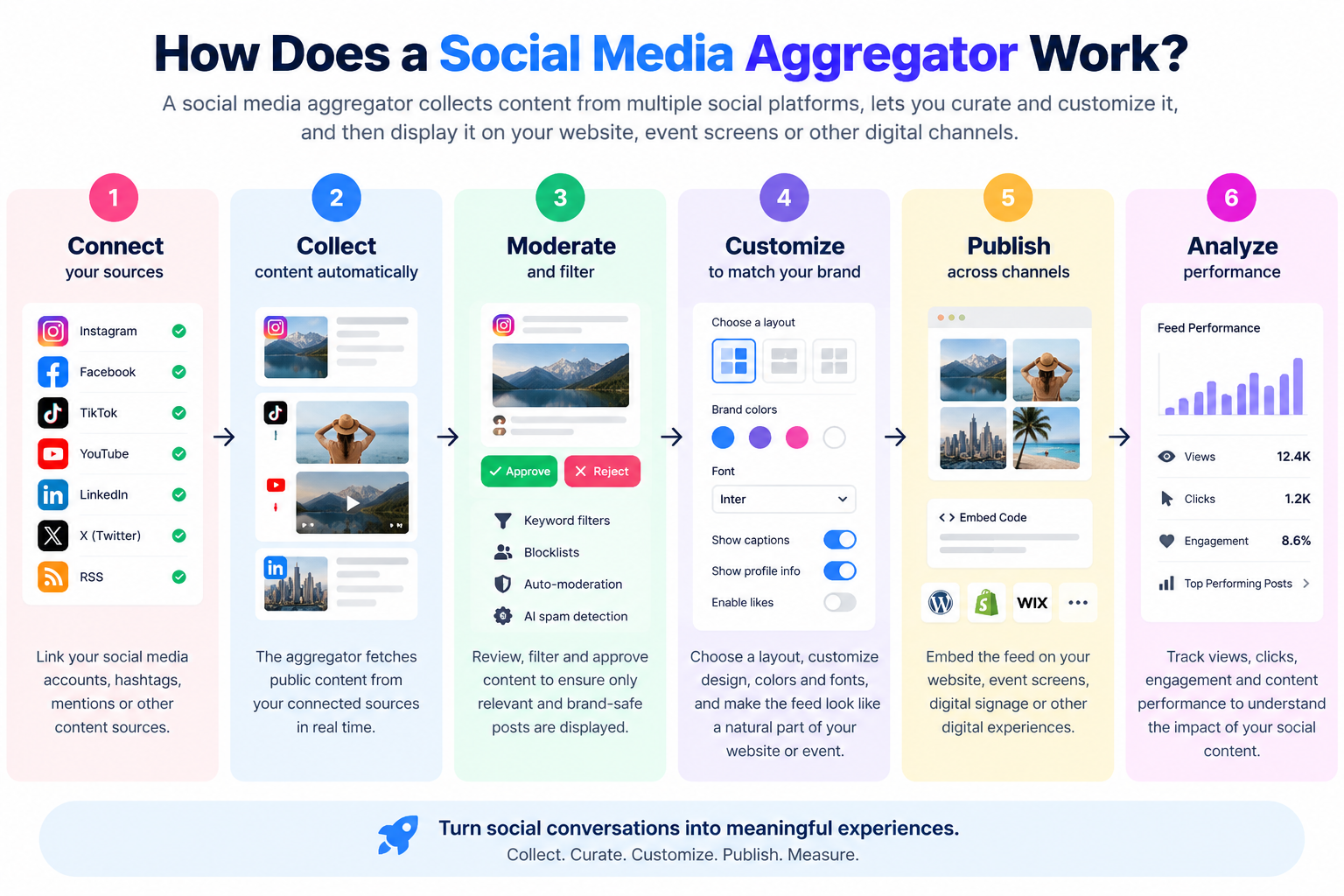
The basic workflow is usually:
Connect → Collect → Moderate → Customize → Publish → Analyze
First, you connect your social sources. The aggregator retrieves available content through supported integrations or APIs. You can then filter or moderate the content, customize how it looks and embed or display the resulting feed.
For example, a conference could collect posts containing its event hashtag, remove irrelevant posts, customize the feed to match the event branding, and display approved posts on screens around the venue.
What Can Social Media Aggregator Tools Collect?
The exact options vary between platforms, but common sources include:
- TikTok
- YouTube
- X
- Hashtags
- Mentions
- User-generated content
- Reviews
- RSS feeds
For example, Walls.io currently says it supports more than 14 sources, including Instagram, LinkedIn, X, TikTok, Facebook, YouTube, Bluesky and RSS.
What Should You Look for in a Social Media Aggregator Tool?

The right tool depends on what you need to collect and where you plan to display it.
Social Media Network Support
Start by identifying the networks that matter to your business.
If your campaign relies heavily on Instagram and TikTok, for example, there is little value in choosing a platform that has extensive support for networks you don’t use.
Also check exactly what the integration supports. Some tools may support an entire network but limit available source types or features depending on API restrictions and subscription level.
Hashtag, Mention and Account Aggregation
Hashtags and mentions are particularly useful for campaigns, events and UGC.
A conference might collect:
#ConferenceName2026
A retailer could collect posts mentioning its brand.
A product launch could collect customer posts using a campaign hashtag.
Check whether the platform supports the specific source types you need rather than assuming every tool offers identical aggregation capabilities.
Content Moderation and Filtering
Moderation is one of the most important features of an aggregator.
Your feed may collect content you don’t want to display publicly, including spam, irrelevant posts or inappropriate content.
Useful moderation capabilities can include:
- Manual approval
- Keyword filtering
- Blocklists
- Allow lists
- Automatic moderation
- AI-assisted moderation
- Source-level filtering
Walls.io, for example, documents automatic and manual moderation, keyword filters and AI-powered spam detection.
Customization and Branding
A social feed should look like part of your website or campaign rather than a disconnected third-party component.
Look for:
- Multiple layouts
- Fonts
- Colors
- Headers
- Card styles
- Responsive layouts
- Custom CSS
- Branding controls
- Custom templates
Customization becomes particularly important when the feed appears on a high-traffic landing page or inside a branded event environment.
Website and CMS Compatibility
Before choosing a tool, check how it can be embedded into your website.
Common options include:
- HTML/JavaScript embed
- WordPress plugins
- Shopify apps
- Wix integrations
- Webflow
- Squarespace
- Other CMS integrations
A platform that works well for a developer-built website may not be the easiest option for a marketing team working inside WordPress or Shopify.
Real-Time Content Updates
Refresh frequency matters when the feed is being used for live events.
For an evergreen website widget, updates every few minutes may be sufficient.
For a live conference or event, however, you may want content to appear much faster.
Always check the refresh rate and whether it varies by subscription plan.
Analytics and Reporting
Analytics can help you understand whether your aggregated content is actually contributing to your goals.
Depending on the platform, you may be able to measure:
- Feed views
- Clicks
- Engagement
- Content performance
- Source performance
- User interactions
If the objective is simply to display social proof, basic analytics may be enough. If you’re running a large UGC campaign, more detailed reporting may be useful.
UGC Rights Management
User-generated content can be valuable, but brands should think about permissions and usage rights.
If you’re collecting customer content for advertising, ecommerce or other commercial purposes, investigate how the platform handles rights management and content permissions.
API and Developer Access
An API becomes useful when you want to integrate aggregated content into a custom application rather than simply embedding a ready-made widget.
Check:
- API availability
- Documentation
- Authentication
- Rate limits
- Available endpoints
- Subscription requirements
For example, elfsight currently documents a REST API for integrating social aggregation into custom applications and website experiences.
Ecommerce and Shoppable Content
For ecommerce brands, displaying social content isn’t necessarily the end goal.
You may want visitors to move from:
Social post → Product discovery → Product page → Purchase
Some platforms therefore offer shoppable galleries or product-tagging functionality.
If social commerce is important to your business, compare these capabilities separately instead of choosing a platform purely on its number of supported networks.
Pricing and Scalability
Don’t compare subscription prices without comparing what you receive for that price.
Check:
- Number of feeds
- Number of sources
- Monthly views
- Number of websites
- Number of posts
- Refresh frequency
- Branding restrictions
- Analytics
- API access
- Support
- User seats
A cheaper plan may become more expensive once you need the features required for a real campaign.
10 Best Social Media Aggregator Tools
There isn’t one universally appropriate social media aggregator for every business. The following tools serve somewhat different requirements, so evaluate them against your own use case.
1. Taggbox
Particularly useful for: UGC campaigns, social feeds, social media wall for events, websites and social-commerce experiences.
Taggbox is a social media aggregation and UGC platform that brings content from multiple sources into a centralized feed that can be moderated, customized and displayed across digital channels.
Its current product positioning includes social aggregation, UGC campaigns, shoppable feeds, events, website publishing, analytics and integrations. A June 2026 comparison published by Taggbox lists more than 20 sources and integrations including Shopify, WordPress, Salesforce, Magento, WooCommerce and Wix, with API access available on higher tiers.
Key capabilities
Depending on the product and plan, businesses can use Taggbox for:
- Social media aggregation
- UGC collection
- Content moderation
- Social feeds
- Social walls
- Website embedding
- Shoppable UGC
- Analytics
- Events
- Reviews and social proof
Who should consider Taggbox?
Taggbox is particularly relevant when social aggregation is only one part of the requirement and you also need UGC, moderation, social commerce or multiple publishing environments.
As with any SaaS platform, verify the current feature availability and pricing for the specific product and plan you intend to use.
2. Walls.io
Particularly useful for: Events, live social walls, digital displays and organizations that need real-time social content.
Walls.io focuses heavily on bringing social content together into a single live feed. Its current product page says it supports 14+ sources and can aggregate content from networks including Instagram, LinkedIn, X, TikTok, Facebook, YouTube, Bluesky and RSS.
Key capabilities
Walls.io currently highlights:
- Real-time aggregation
- Multi-source feeds
- Hashtag and keyword sources
- UGC aggregation
- Manual and automatic moderation
- AI-assisted spam detection
- Custom layouts
- Custom CSS
- Digital displays
- Website embedding
- API access
- GDPR and CCPA compliance
Who should consider Walls.io?
It’s particularly relevant for organizations running events, social walls, live displays or campaigns where real-time content presentation is important.
3. Curator
Particularly useful for: Businesses looking for a straightforward way to aggregate social feeds and embed them on websites.
Curator focuses on collecting content from social networks and displaying it through customizable feeds.
Its appeal is particularly relevant for organizations that want a relatively straightforward website-focused social feed rather than a complex enterprise content operation.
Key capabilities to evaluate
- Supported social networks
- Hashtags and mentions
- Moderation
- Feed customization
- Website embedding
- Templates
- Analytics
- Pricing limits
When comparing Curator with other platforms, look closely at the source limits and features available on each plan rather than comparing only the headline price.
4. Juicer
Particularly useful for: Businesses, agencies and organizations looking for multi-platform social feeds.
Juicer is a social media aggregation platform that combines content from multiple social networks into embeddable feeds.
Its current 2026 comparison page describes support for 15+ social platforms and features such as automatic and manual moderation and custom CSS.
Key capabilities
- Multi-network aggregation
- Social feed embeds
- Moderation
- Custom CSS
- Multiple feed sources
- Website integration
- Enterprise options
Who should consider Juicer?
Juicer can be useful for businesses that primarily need a multi-platform feed and want to embed it on their website without building the aggregation infrastructure themselves.
5. EmbedSocial
Particularly useful for: Social proof, reviews, UGC and social widgets.
EmbedSocial takes a broader approach than simple social feed aggregation, combining social content with reviews and other forms of user-generated content.
Its platform can therefore be relevant when a business wants to use customer-generated content as part of its website conversion strategy.
Key areas to evaluate
- Social feed sources
- Reviews
- UGC
- Moderation
- Templates
- Website widgets
- Ecommerce integrations
- Analytics
This makes it worth considering for websites where social content and customer reviews are part of the same trust-building strategy.
6. Flockler
Particularly useful for: Organizations displaying social content across websites, intranets, digital signage and events.
Flockler positions its platform around aggregating social accounts and UGC and then publishing that content across multiple environments.
Its current pricing page lists 10+ platforms and capabilities such as unlimited layouts, unlimited page views, moderation and custom design/CSS on the Basic plan. Higher plans add AI-powered moderation, additional feeds, video autoplay, API capabilities and other enterprise functionality.
Key capabilities
- Social aggregation
- UGC
- Website embeds
- Digital signage
- Event displays
- Custom layouts
- Moderation
- CSS customization
- Analytics/integrations
- API access on higher plans
Who should consider Flockler?
Flockler can be relevant for organizations that need to distribute aggregated social content across several digital environments rather than using it solely as a small website widget.
7. SociableKIT
Particularly useful for: Simple social media widgets and website integrations.
SociableKIT takes a widget-oriented approach, making it relevant for businesses that want to add social content to a website without building the functionality themselves.
When evaluating a widget-focused platform, pay particular attention to:
- Supported networks
- Customization
- Feed limits
- Refresh frequency
- Branding
- Responsive behavior
- CMS compatibility
It can make sense for simpler implementations where advanced UGC campaigns, APIs or enterprise workflows aren’t required.
8–10. Other Tools Worth Comparing
The market extends beyond these seven platforms. Depending on your requirements, you may also encounter tools such as Elfsight, Smash Balloon and other social feed/widget providers.
The important point is not to select a tool simply because it appears on a “top 10” list.
Compare each candidate against:
- Your social networks
- Your publishing destination
- Your moderation requirements
- Your traffic/usage volume
- Your customization requirements
- Your analytics needs
- Your budget
- Your API requirements
For example, Taggbox’s current comparison page includes Elfsight and Smash Balloon alongside other aggregation platforms, showing how significantly their supported sources, integrations and feature sets differ.
Social Media Aggregator Tools Compared
A feature comparison is more useful when you compare the capabilities that affect implementation.
| Capability | Why it matters |
|---|---|
| Multiple social sources | Lets you combine content from different networks |
| Hashtag aggregation | Useful for campaigns and events |
| Mention aggregation | Captures customer conversations |
| Moderation | Controls what appears publicly |
| Customization | Keeps feeds consistent with your brand |
| Website embedding | Determines implementation complexity |
| Analytics | Measures feed performance |
| UGC rights | Helps manage customer content |
| Shoppable content | Connects social content with ecommerce |
| API | Enables custom integrations |
| Digital signage | Important for physical displays |
| CMS integrations | Simplifies publishing |
The right combination depends on your project. A small business embedding one Instagram feed doesn’t necessarily need the same platform capabilities as an enterprise running a global UGC campaign.
What Can You Use Social Media Aggregator Tools For?
Embed Social Media Feeds on Websites
One of the most common applications is embedding social content directly on a website by using it as a hashtag aggregator or mentions collector
For example, you can display a live social feed on:
- Homepage
- Product pages
- Landing pages
- Blog pages
- Campaign pages
- Event websites
This can add fresh social content without requiring your team to manually update the page every time a new post is published.
Display Social Media at Events
Events are another major use case.
A conference could aggregate posts using its official hashtag and display approved content on venue screens.
Other applications include:
- Conferences
- Trade shows
- Festivals
- Corporate events
- University events
- Product launches
- Weddings
The most important features for these applications are usually real-time updates, moderation and reliable display.
Create Social Walls for Digital Signage
Aggregated social content can also be displayed on:
- Retail screens
- Hotel displays
- Restaurant screens
- Office displays
- Campus screens
- Event screens
In this situation, screen compatibility, reliability, content moderation and layout control become more important than simply having the largest number of social integrations.
Collect and Display User-Generated Content
UGC is another important application.
Brands can collect:
- Customer posts
- Product photos
- Testimonials
- Hashtag content
- Brand mentions
- Reviews
The resulting content can then be displayed as social proof.
Before using customer content commercially, make sure your process for permissions and content rights is appropriate for your use case.
Create Social Commerce Experiences
For ecommerce brands, social aggregation can go beyond displaying posts.
A shoppable UGC social experience can connect:
Customer content → Product → Product page → Purchase
This can make UGC more useful because visitors don’t simply see a customer post; they can potentially discover the product featured in it.
Which Social Media Platforms Can Aggregator Tools Connect?
Support varies by platform and provider.
Common sources include:
Instagram is one of the most common sources for website feeds, UGC and hashtag campaigns.
Facebook pages and other supported content sources can be incorporated into aggregated feeds depending on the provider and available platform APIs.
TikTok
TikTok is increasingly relevant for brands that want to showcase short-form video content.
YouTube
YouTube aggregation can be useful for brands with video libraries, creators or product demonstrations.
LinkedIn feeds can be useful for B2B websites, employer branding and company updates.
X
X can be useful for real-time conversations, events and live commentary, subject to the platform’s API and provider support.
Hashtags and Mentions
Hashtags and mentions are particularly valuable for campaign-based aggregation because they allow brands to collect content related to a particular topic rather than relying only on their own accounts.
Always verify the exact source type and functionality offered by a provider before choosing a tool.
Are There Free Social Media Aggregator Tools?
Yes. Several providers offer free plans or free trials, although the limitations vary considerably.
A free plan may limit:
- Number of sources
- Number of feeds
- Monthly views
- Number of posts
- Refresh frequency
- Customization
- Branding
- Analytics
- Support
The current market includes free options from providers such as Juicer, Taggbox, Curator and EmbedSocial, although their limits and included features differ.
What Can You Do With a Free Social Media Aggregator?
A free plan can be useful when you’re:
- Testing a concept
- Running a small website
- Building a prototype
- Evaluating a provider
- Managing a low-volume feed
For a large event, ecommerce website or high-traffic publication, you’ll probably need to examine paid-plan limits more carefully.
When Should You Upgrade to a Paid Tool?
Consider upgrading when you need:
- More feeds
- More sources
- Higher traffic limits
- Faster refresh rates
- Advanced moderation
- Custom CSS
- Analytics
- Removal of branding
- API access
- Dedicated support
The key is to upgrade because you need additional capabilities, not simply because the free plan exists.
How to Add a Social Media Aggregator to Your Website
The exact process depends on the platform, but most no-code aggregators follow a similar workflow.
Choose Your Social Sources
Start by deciding exactly what you want to collect.
For example:
Instagram account + TikTok account + branded hashtag
This is better than connecting every available source simply because you can.
Create and Customize Your Feed
Select the layout and branding that fit the page.
Depending on the tool, you may be able to control:
- Layout
- Colors
- Fonts
- Spacing
- Post design
- Number of columns
- Headers
- Custom CSS
Moderate the Content
Review the content before displaying it publicly if your campaign allows user-generated submissions.
Use filters and moderation rules to remove irrelevant or inappropriate content.
Generate the Embed Code
Most website-oriented aggregators provide an embed code or CMS integration.
You can then add the feed to the appropriate page.
Add It to Your Website
Depending on your CMS, this might mean:
- Adding an HTML block
- Installing a plugin
- Adding a widget
- Installing an app
- Adding JavaScript
- Using an API
Monitor Performance
After publishing, monitor:
- Feed loading
- Page speed
- User interactions
- Clicks
- Conversions
- Content freshness
- Mobile appearance
A visually impressive feed isn’t useful if it slows down the page or doesn’t contribute to the user’s journey.
Social Media Aggregator Tools for Different Platforms
WordPress
Look for:
- WordPress plugins
- Shortcode support
- Widget support
- Lightweight embeds
- Customization
Shopify
For Shopify stores, check whether the provider offers a dedicated app or a compatible embed method.
Also consider whether the social feed can support ecommerce objectives such as UGC and product discovery.
Wix
No-code embedding and native integrations can make implementation easier for Wix users.
Webflow
Webflow users will often benefit from an embed-based implementation, although the exact method depends on the provider.
Squarespace
Check whether the provider supports code blocks or another integration method compatible with your Squarespace setup.
Custom HTML Websites
For custom websites, compare:
- JavaScript embeds
- REST APIs
- Authentication
- Webhooks
- Caching
- Rate limits
- Developer documentation
This is where API access can become significantly more important.
How to Choose the Right Social Media Aggregator Tool
Rather than asking:
“Which social media aggregator is the best?”
start with:
“Which capabilities do I actually need?”
| Your goal | Prioritize |
|---|---|
| Website social feed | Embedding + customization |
| Event social wall | Real-time updates + moderation |
| UGC campaign | Hashtags + mentions + rights management |
| Ecommerce | Shoppable content + UGC |
| Digital signage | Reliability + display support |
| Enterprise implementation | API + security + support |
| Small business | Ease of use + pricing |
This approach avoids paying for features you don’t need while ensuring that the tool you select can support your actual workflow.
Social Media Aggregator vs Social Media Management Tool
These terms sound similar, but they solve different problems.
A social media aggregator primarily focuses on:
Collect → curate → moderate → display
A social media management platform generally focuses on:
Create → schedule → publish → monitor → manage
Some platforms overlap, but their primary purposes are different.
If you want to display Instagram posts on your website, you don’t necessarily need a complete social media management platform.
Social Media Aggregator vs Social Media Wall
A social media aggregator is the underlying collection and curation technology.
A social media wall is typically the visual experience created from that aggregated content.
Think of it as:
Aggregator = collection layer
Social wall = presentation layer
A social wall may therefore use an aggregator to collect posts from multiple networks before displaying them on a website or screen.
Social Media Aggregator vs Social Media Feed Widget
A social media aggregator focuses on collecting content.
A social media widget focuses primarily on presenting content on a website.
In practice, many modern tools combine both capabilities.
For example:
Instagram + TikTok + Facebook → Aggregation → Moderation → Social Feed Widget → Website
Understanding this distinction makes it easier to compare tools that use different terminology for similar functionality.
How We Evaluated Social Media Aggregator Tools
A useful social media aggregator comparison shouldn’t be based purely on marketing claims.
When evaluating an aggregator, look at:
- Supported social sources
- Available source types
- Moderation capabilities
- Customization
- Embedding options
- CMS integrations
- Analytics
- API availability
- UGC rights management
- Pricing and usage limits
- Customer support
- Relevant use cases
Pricing and product capabilities can change, so current provider documentation should always take precedence over an older comparison article.
What to Test Before Choosing a Social Media Aggregator?
If the platform offers a free plan or trial, test it using your actual requirements.
Connect a real social source
Don’t evaluate the tool using only demo content.
Test refresh speed
Publish a test post and measure how quickly it appears.
Test moderation
Try filtering unwanted keywords or approving/rejecting content.
Test customization
See whether the feed actually matches your website.
Test mobile responsiveness
Check the feed on real mobile devices rather than relying only on a desktop preview.
Test page performance
Measure whether the widget affects Core Web Vitals or page loading.
Test analytics
Make sure the metrics provided are useful for your business goals.
Check usage limits
Look beyond the starting price.
Check:
- Views
- Feeds
- Sources
- Websites
- Posts
- API requests
Test support
Ask a real implementation question before purchasing. The response can tell you a lot about the level of support you can expect.
Frequently Asked Questions About Social Media Aggregator Tools
What is a social media aggregator tool?
A social media aggregator tool collects content from multiple social networks, hashtags, mentions or accounts and combines it into a feed that can be moderated, customized and displayed across websites, events, digital signage and other channels.
What does a social media aggregator do?
It automates the collection of social content so you don’t have to manually copy posts from different platforms. Depending on the tool, you can also filter, moderate, customize, analyze and publish the collected content.
How does a social media aggregator work?
Most tools follow a workflow of connecting social sources, collecting available content, filtering or moderating it, customizing the display and publishing it through an embed, widget, application or API.
What is the best social media aggregator for a website?
There isn’t one option that is best for every website. The appropriate choice depends on the social networks you need, customization requirements, moderation, traffic volume, integrations, analytics, budget and whether you need advanced features such as UGC or APIs.
Are there free social media aggregator tools?
Yes. Several providers offer free plans or trials, but limitations can include the number of sources, feeds, views, refresh frequency, branding and available customization. Always compare the limits rather than looking only at the word “free.”
Can I aggregate Instagram, Facebook, TikTok and YouTube in one place?
Some social media aggregation platforms support multiple networks in one feed. However, the exact networks and source types available vary between providers, so check the current integration list before selecting a tool.
Can I embed a social media aggregator on WordPress?
Yes. Many social media aggregator platforms provide WordPress plugins, widgets, shortcodes or standard embed codes. The easiest implementation depends on the provider and the type of feed you’re creating.
Can I use a social media aggregator on Shopify?
Yes, depending on the provider. Some platforms provide Shopify integrations or apps, while others use standard embed codes.
Can social media aggregators collect hashtags?
Many platforms support hashtag-based aggregation. This is particularly useful for events, contests, product launches and UGC campaigns.
Can I moderate social media posts before displaying them?
Many aggregators provide moderation tools, although the exact capabilities differ. Options can include manual approval, keyword filtering, blocklists, automatic moderation and AI-assisted filtering.
Can I use social media aggregators for events?
Yes. Event organizers commonly use aggregated social content to create social walls, collect hashtag posts and display attendee content on venue screens or event websites.
Are social media aggregator tools useful for ecommerce?
They can be, particularly when they combine social content with UGC, product discovery or shoppable experiences. The value depends on how effectively the social content supports the customer’s path to purchase.
Do social media aggregators provide analytics?
Some do. Available analytics can include feed views, clicks, engagement and content performance. Compare the actual reporting capabilities rather than assuming every provider offers the same level of analytics.
Do social media aggregators support APIs?
Some platforms provide APIs, but API availability, endpoints and usage limits can vary by plan. If you need a custom integration, check the provider’s API documentation before purchasing.
What’s the difference between a social media aggregator and a social media management tool?
A social media aggregator primarily collects and displays content from different sources, while a social media management platform focuses more on creating, scheduling, publishing and managing social media activity.
Final Thoughts: Which Social Media Aggregator Tool Should You Choose?
The right social media aggregator depends on what you want to collect, where you want to display it and how much control you need over moderation, customization, analytics and integrations.
For a simple website feed, ease of use and embedding may be the most important factors. For an event, real-time aggregation and moderation may matter more. For ecommerce, UGC and shoppable content can become central. And for an enterprise implementation, APIs, security, scalability and support may outweigh the starting subscription price.
Before choosing a platform, create a short list based on your actual requirements and test the features that matter most.
Don’t choose based solely on the number of supported networks or the lowest advertised price.
Choose the platform that fits the complete workflow:
Collect → Moderate → Customize → Publish → Measure.
Want to Turn Your Social Content Into a Website Experience?
Connect your social sources, curate the content you want visitors to see, customize the feed to match your brand, and publish it across your website or other digital experiences.
Create your social media feed and see how it works.






Leave a Reply